Advantages and Disadvantages of Keyboard
Published: 21 Oct 2026
A keyboard is one of the most common computer input devices used to enter text, numbers, commands, and other information. From students and office workers to programmers and gamers, almost everyone uses a keyboard for everyday computer tasks.
However, like every input device, a keyboard has both benefits and limitations. Understanding the advantages and disadvantages of a keyboard can help you choose the right type and use it more effectively.
What Is a Keyboard?
A keyboard is an input device that allows users to enter letters, numbers, symbols, and commands into a computer or other compatible device. Most traditional keyboards use the QWERTY layout, which is familiar to users worldwide.
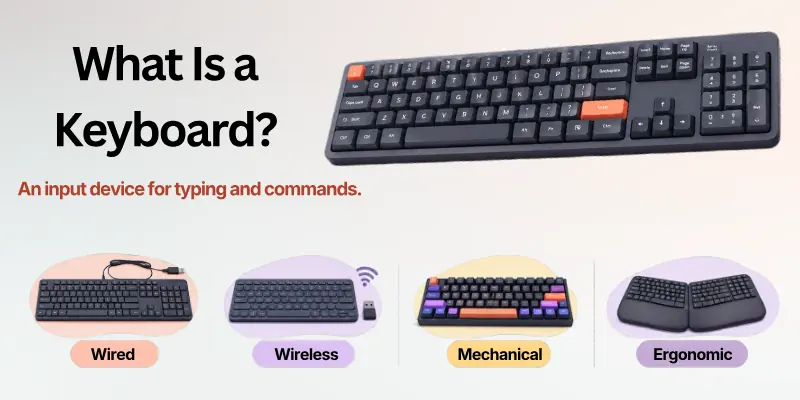
Modern keyboards are available in different forms, including wired, wireless, mechanical, ergonomic, gaming, and laptop keyboards. Each type is designed for different needs, preferences, and working environments.
How Does a Keyboard Work?
When you press a key, the keyboard detects the keystroke and sends an electronic signal to the computer. The operating system then interprets that signal and performs the required action.
For example, pressing a letter key enters that character, while combinations such as Ctrl + C and Ctrl + V allow users to copy and paste information quickly.
Quick Tip: Learning common keyboard shortcuts can significantly improve productivity because many computer tasks can be completed without reaching for the mouse.
Advantages of Keyboard
A keyboard offers several benefits that make it an essential computer peripheral. Its speed, versatility, affordability, and shortcut functionality make it useful for both basic and professional computer tasks. Here are some of the major advantages of keyboard use.
1. Fast and Efficient Data Entry
One of the biggest advantages of a keyboard is fast data entry. Skilled typists can enter large amounts of text considerably faster than writing information manually.
Keyboards are particularly useful for writing documents, emails, reports, assignments, and other text heavy content.
2. Easy to Use
Most keyboards follow familiar layouts, especially the standard QWERTY keyboard. Once users learn the position of the main keys, they can type without constantly looking at the keyboard.
This makes keyboards suitable for students, office employees, writers, programmers, and general computer users.
3. Keyboard Shortcuts Save Time
Keyboard shortcuts allow users to perform many actions without using a mouse. Common shortcuts such as Ctrl + C, Ctrl + V, Ctrl + Z, and Ctrl + S can make everyday computers work much faster.
Shortcuts are especially useful for professionals who regularly work with documents, spreadsheets, editing software, programming tools, and other applications.
4. Accurate Text Input
A physical keyboard provides clear and consistent keys for entering letters, numbers, and symbols. With proper typing skills, users can achieve high levels of accuracy.
Touch typing can further improve accuracy because users learn to type using finger positions rather than searching for individual keys.
5. Available in Different Types
Another important advantage is the wide variety of keyboards available today. Users can choose a keyboard according to their comfort, work requirements, budget, or personal preference.
Common options include mechanical, membrane, ergonomic, wireless, gaming, and compact keyboards.
6. Useful for Different Tasks
A keyboard is not limited to typing documents. It can also be used for programming, gaming, spreadsheet work, navigation, data entry, editing, and controlling software.
Function keys, navigation keys, modifier keys, and programmable keys provide additional functionality.
7. Affordable and Easy to Replace
Basic keyboards are generally affordable and widely available. If an external keyboard stops working, users can often replace it without replacing the entire computer.
This makes a standard keyboard a cost effective computer input device for homes, schools, offices, and businesses.
8. Durable Options Are Available
Many modern keyboards are designed to withstand frequent use. Mechanical keyboards, in particular, can offer excellent durability because their switches are designed for repeated keystrokes.
However, durability varies according to the keyboard type, construction quality, and level of use.
Important: A more expensive keyboard is not automatically better. The best choice depends on how, where, and how often you use it.
Disadvantages of Keyboard
Despite its many benefits, a keyboard also has some limitations. These drawbacks can become more noticeable during long working sessions or when a keyboard is used for tasks better suited to other input devices. Below are some common disadvantages of keyboard use.
1. Can Cause Hand and Wrist Strain
Typing for extended periods may cause discomfort in the fingers, hands, wrists, or forearms. Poor posture and incorrect hand positioning can make the problem worse.
An ergonomic keyboard and a properly adjusted workstation may improve comfort, especially for people who type for long periods.
2. Requires Physical Space
A traditional full size keyboard needs desk space. This can be inconvenient when working on a small desk or in a crowded workspace.
Compact and wireless keyboards can reduce the amount of space required, but smaller layouts may remove or rearrange some keys.
3. Typing Errors Can Occur
Users can accidentally press the wrong key, especially when typing quickly. Errors may also occur because of unfamiliar layouts, poor typing skills, or worn out keys.
Although typing practice can improve accuracy, keyboards cannot completely eliminate human input errors.
4. Not Ideal for Drawing and Graphic Tasks
A keyboard is excellent for entering text and commands, but it is not the most suitable device for drawing, freehand sketching, or precise graphical selection.
For such activities, a mouse, graphics tablet, stylus, or touchscreen may provide better control.
5. Learning Touch Typing Takes Time
Beginners may need time and practice to become comfortable with a keyboard. Learning touch typing can initially feel difficult because users must remember key positions and develop proper finger coordination.
The good news is that regular practice can gradually improve typing speed and accuracy.
6. Can Be Difficult for Some Users
People with limited hand or wrist movement may find a conventional keyboard difficult to operate. Standard keyboards require repeated finger movements and physical key presses.
Alternative input methods, accessibility features, and specially designed keyboards can provide more suitable options for some users.
7. Cleaning Can Be Difficult
Dust, food particles, and other debris can collect between keyboard keys. Cleaning a full size keyboard may take time, particularly when the keys are tightly arranged.
Regular cleaning can help maintain hygiene and prevent debris from affecting key performance.
8. Some Keyboards Can Be Noisy
Mechanical and clicky keyboards can produce noticeable sounds during typing. While some users enjoy the tactile and audible feedback, the noise may disturb people nearby.
For quiet environments, a low noise membrane or quieter mechanical keyboard may be a better option.
Useful Tip: If noise is a concern, check the keyboard’s switch type and noise level before purchasing it.
Advantages vs. Disadvantages of Keyboard
The benefits and drawbacks of a keyboard depend largely on the user’s needs. A keyboard can be extremely efficient for typing and computer commands, but it may be less convenient for drawing, portability, or users who experience discomfort during prolonged typing.
| Advantages | Disadvantages |
| Fast text and data entry | Can cause hand or wrist strain |
| Easy to learn and use | Requires physical desk space |
| Supports keyboard shortcuts | Typing errors can occur |
| Available in many types | Not ideal for drawing |
| Affordable options available | Some types can be noisy |
| Useful for many computer tasks | Cleaning may require effort |
| Durable models are available | Some users may find it difficult to operate |
| Improves productivity | Requires practice for fast typing |
Things to Remember: There is no single keyboard that is perfect for every user. Comfort, typing style, workspace, budget, and intended use should all be considered before making a choice.
Different Types of Keyboards
The market offers several keyboard types, each designed for a particular purpose. Choosing the right type can make a significant difference in typing comfort and overall productivity.
Mechanical Keyboard
Mechanical keyboards use individual switches beneath the keys. They are popular among gamers, programmers, and people who prefer tactile feedback.
They are often durable and customizable, but some models can be more expensive and louder than standard keyboards.
Membrane Keyboard
Membrane keyboards use a membrane layer to register key presses. They are generally affordable, quiet, and suitable for everyday computer use.
However, they may provide less tactile feedback than mechanical keyboards and may not offer the same level of customization.
Ergonomic Keyboard
Ergonomic keyboards are designed to encourage a more natural hand and wrist position. Some feature split layouts, curved designs, or adjustable angles.
They can be useful for people who spend many hours typing, although their unusual layouts may require an adjustment period.
Wireless Keyboard
Wireless keyboards connect to computers through technologies such as Bluetooth or a wireless receiver. They help reduce cable clutter and can provide a cleaner workspace.
Their limitations may include battery or charging requirements and potential connectivity issues.
Gaming Keyboard
Gaming keyboards often include features such as programmable keys, anti ghosting, customizable lighting, and responsive switches.
They are designed primarily for gaming but can also be useful for users who want additional customization and fast key response.
Recommended: Choose a keyboard based on your actual needs rather than buying one simply because it has more features.
Keyboard vs. Other Input Devices
A keyboard is one of several ways to interact with a computer. Different input devices are better suited to different tasks.
| Input Device | Best For | Main Benefit | Main Limitation |
| Keyboard | Typing and commands | Fast text entry | Not ideal for drawing |
| Mouse | Navigation and selection | Precise pointer control | Less efficient for long text |
| Touchscreen | Direct interaction | Easy touch based control | Can be tiring for long typing |
| Graphics Tablet | Drawing and design | Precise digital drawing | More specialized |
| Voice Input | Hands free commands | No physical typing required | Accuracy can vary |
This comparison shows why keyboards remain important even though computers now support many alternative input methods.
Quick Suggestion: For everyday computer use, combining a keyboard with a mouse or another suitable input device often provides the most flexible experience.
How to Choose the Right Keyboard
Choosing a keyboard becomes easier when you know what features matter for your specific needs. Consider the following factors before purchasing one.
1. Consider Your Main Purpose
Think about what you do most often. Writers may prioritize comfort and typing feel, while gamers may prefer responsive switches and programmable controls.
2. Check the Keyboard Layout
Make sure the layout includes the keys you regularly use. A full size keyboard may be useful for spreadsheet work, while a compact keyboard can be better for limited desk space.
3. Think About Comfort
If you type for several hours each day, comfort should be a major consideration. Look for a suitable key feel, wrist position, keyboard height, and overall layout.
4. Decide Between Wired and Wireless
A wired keyboard is simple and does not require battery charging. A wireless keyboard offers a cleaner setup and greater flexibility.
5. Set a Realistic Budget
Keyboard prices vary significantly. A basic model can be sufficient for normal typing, while specialized mechanical, ergonomic, or gaming keyboards may cost considerably more.
Important Note: Features such as RGB lighting, programmable keys, and premium switches are useful only if they match your actual requirements.
Simple Checklist Before Buying a Keyboard
Use this checklist to compare your options before making a purchase:
- Choose the correct keyboard size.
- Check whether you prefer wired or wireless connectivity.
- Consider typing comfort and key feel.
- Check compatibility with your computer or device.
- Consider noise levels if you work around other people.
- Look for an ergonomic design if you type for long periods.
- Compare durability and build quality.
- Make sure the price fits your budget.
- Check whether you need a numeric keypad.
- Consider extra features only when they are genuinely useful.
Useful Tip: Don’t choose a keyboard solely because it is popular. A simple keyboard that feels comfortable can be a better choice than an expensive model with features you never use.
How to Use a Keyboard More Effectively
Good keyboard habits can help you work faster and more comfortably. Before working on this use any online keyboard testing tool to test this device safely. Start by maintaining a comfortable sitting position and keeping your keyboard at an appropriate height.
Practice touch typing gradually instead of focusing only on speed. Accuracy should come first because fewer mistakes can ultimately save more time.
Helpful Keyboard Habits
- Keep your wrists in a comfortable, neutral position.
- Avoid pressing keys harder than necessary.
- Learn frequently used keyboard shortcuts.
- Take regular breaks during long typing sessions.
- Keep the keyboard clean and free from debris.
- Adjust your workstation for comfortable posture.
Warning: If typing regularly causes persistent discomfort, do not simply ignore it. Consider adjusting your workstation, reducing repetitive strain, and seeking appropriate professional advice when necessary.
Conclusion
The advantages and disadvantages of a keyboard show that keyboards remain one of the most useful and practical computer input devices. They offer fast data entry, easy operation, shortcut support, versatility, affordability, and a wide range of designs.
At the same time, keyboards can have limitations such as physical strain, space requirements, typing errors, cleaning needs, and reduced suitability for graphical tasks. The best keyboard therefore depends on your individual requirements, typing habits, workspace, and budget.
Whether you choose a standard, mechanical, ergonomic, wireless, or gaming keyboard, focusing on comfort, functionality, durability, and intended use will help you make a better decision.
Frequently Asked Questions About Keyboard
The following FAQs answer some common questions about the advantages and disadvantages of a keyboard, including its uses, benefits, limitations, and different types.
1. What are the main advantages of a keyboard?
The main advantages include fast data entry, easy text input, keyboard shortcuts, versatility, affordability, and availability in different designs. Keyboards are especially useful for typing documents, coding, data entry, and everyday computer tasks.
2. What are the main disadvantages of a keyboard?
Common disadvantages include physical strain from prolonged typing, the need for desk space, typing errors, cleaning requirements, and limited suitability for drawing or other graphical tasks.
3. Is a keyboard an input device?
Yes. A keyboard is an input device because it sends text, numbers, symbols, and commands to a computer or other compatible device.
4. Which type of keyboard is best for typing?
There is no single best keyboard for everyone. Mechanical keyboards may suit users who prefer tactile feedback, while membrane or scissor switch keyboards may be better for people who want a quieter and simpler typing experience.
5. Can using a keyboard improve typing speed?
Yes. Regular typing practice can improve both speed and accuracy. Learning touch typing and common keyboard shortcuts can make computer work more efficient.
6. What are the benefits of an ergonomic keyboard?
An ergonomic keyboard is designed to encourage a more natural hand and wrist position. It may improve comfort for people who spend long periods typing, although users may need time to adjust to its layout.
7. Is a wireless keyboard better than a wired keyboard?
It depends on your needs.
- Wireless: Less cable clutter and greater flexibility.
- Wired: No battery charging and a simple connection.
8. Are mechanical keyboards better than membrane keyboards?
Mechanical keyboards can offer stronger tactile feedback, customization, and durability, while membrane keyboards are often quieter and more affordable. The better choice depends on your preferences and intended use.
9. How can I take better care of my keyboard?
Follow these simple steps:
- Keep food and liquids away from the keyboard.
- Clean dust and debris regularly.
- Avoid hitting or pressing keys unnecessarily hard.
- Store portable keyboards safely when not in use.
- Follow the manufacturer’s cleaning instructions.
10. Can a keyboard be useful for productivity?
Yes. Keyboard shortcuts, fast typing, navigation keys, and programmable functions can help users complete many computer tasks more efficiently. For content creators researching this topic, a keyword testing tool can also help evaluate keyword variations and search focused content before publishing.




- Be Respectful
- Stay Relevant
- Stay Positive
- True Feedback
- Encourage Discussion
- Avoid Spamming
- No Fake News
- Don't Copy-Paste
- No Personal Attacks
- Be Respectful
- Stay Relevant
- Stay Positive
- True Feedback
- Encourage Discussion
- Avoid Spamming
- No Fake News
- Don't Copy-Paste
- No Personal Attacks
