Wired vs Wireless Keyboards Comparison: Differences, Pros, Cons, and Which One Is Better?
Published: 28 Oct 2026
Choosing between a wired vs wireless keyboard can be confusing, especially when both types look similar and offer many of the same features. The main difference is simple: a wired keyboard uses a physical cable, while a wireless keyboard connects to a computer without a data cable.
Both options can be good, but the right choice depends on how you use your computer. Factors such as connection, battery life, portability, gaming performance, desk setup, price, and convenience can all affect your decision.
What Is a Wired Keyboard?
A wired keyboard connects directly to a computer through a cable, most commonly using a USB connection. Because the keyboard receives its connection through the cable, it does not normally need a separate battery.
Wired keyboards are popular for desktop computers, offices, schools, and gaming setups because they provide a simple connection and are ready to use when connected to a compatible device.
Important Things to Know: A wired keyboard may be the better choice if you want a simple setup without charging or replacing batteries.
What Is a Wireless Keyboard?
A wireless keyboard connects to a computer without a traditional data cable. Most wireless keyboards use either Bluetooth or a dedicated wireless USB receiver.
Wireless keyboards are popular because they reduce cable clutter and are easy to move around. They can also be useful with laptops, tablets, smart TVs, and other compatible devices.
Useful Tip: Before buying a wireless keyboard, check whether your computer supports the connection type you need. Some wireless keyboards require a USB receiver, while others connect directly through Bluetooth.
Wired vs Wireless Keyboards: Quick Comparison
Before looking at individual features, this table gives you a quick overview of the major differences between wired and wireless keyboards.
| Feature | Wired Keyboard | Wireless Keyboard |
| Connection | Physical cable | Bluetooth or wireless receiver |
| Battery | Usually not required | Usually required or rechargeable |
| Cable | Yes | No data cable |
| Portability | Moderate | Usually easier |
| Desk setup | More cable clutter | Cleaner setup |
| Connection stability | Generally very consistent | Can depend on wireless conditions |
| Charging | Usually not needed | Needed for rechargeable models |
| Setup | Plug in and use | May require pairing or receiver |
| Gaming | Very popular | Good options available |
| Office work | Excellent | Excellent |
| Travel | Less convenient | More convenient |
| Multi device use | Usually limited by connection | Common on some models |
Remember: Neither type is automatically better for everyone. Your needs should determine which keyboard makes more sense.
Wired vs Wireless Keyboard: How Do They Work?
The two keyboard types send key presses to your computer in different ways. A wired keyboard sends information through its cable, while a wireless keyboard sends information using a wireless connection.
Wireless keyboards commonly use Bluetooth or a dedicated radio frequency receiver. Wired models usually connect through USB.
Connection Types at a Glance
- USB wired: Connects directly through a USB cable.
- Bluetooth wireless: Connects directly to compatible devices.
- 2.4 GHz wireless: Usually connects through a small USB receiver.
- Multi mode: Some keyboards support more than one connection type.
Suggestion: If you regularly switch between a laptop, tablet, and desktop, a wireless keyboard with multi device support may be especially convenient.
Wired vs Wireless Keyboards: Performance Comparison
Performance is one of the most important factors when comparing keyboards. For everyday typing, both wired and wireless keyboards can provide a smooth experience.
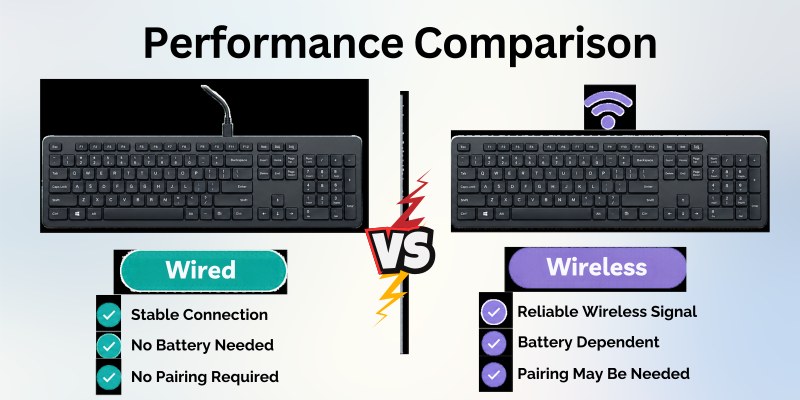
For gaming and other activities where very fast response is important, some users prefer wired keyboards because the direct connection removes the need to manage wireless pairing, batteries, or radio communication.
Performance Checklist
- Check connection stability.
- Consider response time if you are a competitive gamer.
- Check whether the wireless keyboard supports a reliable connection.
- Consider battery level during long sessions.
- Look at the keyboard’s specifications rather than assuming one connection type is always faster.
Important Things to Know: Modern wireless keyboards can perform very well. The difference between a good wireless keyboard and a good wired keyboard may be much less noticeable during normal typing than beginners expect.
Wired Keyboards: Advantages
Wired keyboards have remained popular for decades because they are simple and dependable. Once connected, they generally do not require wireless pairing or battery management.
Main Benefits of Wired Keyboards
- No battery charging: Most wired models receive power through the cable.
- Simple setup: Plug the keyboard into a compatible port.
- Consistent connection: The physical cable provides a direct connection.
- Popular for gaming: Many gamers prefer wired models.
- No wireless receiver: There is no small receiver to lose.
- Suitable for long sessions: You do not normally need to stop to recharge the keyboard.
Recommended: Choose a wired keyboard if you prefer a simple plug and use setup and do not mind having a cable on your desk.
Wired Keyboards: Disadvantages
Although wired keyboards are convenient in many situations, they also have some limitations.
Common Drawbacks
- The cable can create desk clutter.
- Moving the keyboard far from the computer may be difficult.
- Cable length can limit placement.
- Traveling with a cable can be less convenient.
- A damaged cable may affect the keyboard’s connection.
Useful Tip: If cable clutter bothers you, use a cable clip or cable management channel to keep the keyboard wire organized.
Wireless Keyboards: Advantages
Wireless keyboards are designed for convenience and a cleaner workspace. Because there is no data cable between the keyboard and computer, you have more freedom to position the keyboard. Main benefits of wireless keyboards are as follows:
- Less cable clutter: No keyboard data cable across the desk.
- Portable: Easier to move around.
- Clean appearance: Useful for minimalist workspaces.
- Flexible placement: You can position the keyboard more freely.
- Multi device options: Some models can connect to several devices.
- Useful for presentations: You can control a computer from a short distance.
Suggestion: A wireless keyboard is a strong option if you regularly move between devices or want a clean and flexible desk setup.
Wireless Keyboards: Disadvantages
Wireless keyboards also have a few things you need to consider. The biggest difference is that the keyboard needs a source of stored or replaceable power.
Common Drawbacks
- It needs charging or batteries.
- The connection can occasionally be interrupted.
- Bluetooth pairing may require extra setup.
- A USB receiver can be lost.
- Wireless performance can depend on the keyboard, receiver, environment, and device.
- You may need to troubleshoot pairing or connection problems.
Warning: Do not ignore the battery indicator. A wireless keyboard with a low battery can stop working at an inconvenient time.
Wired vs Wireless Keyboards for Gaming
Gaming is one area where keyboard choice can become more important. Many gaming keyboards are wired because gamers often value a stable connection and do not want to worry about battery levels during long sessions.
However, modern wireless gaming keyboards can also provide excellent performance. The quality of the wireless technology and keyboard matters more than simply choosing wired or wireless.
| Gaming Factor | Wired | Wireless |
| Connection | Direct | Wireless |
| Battery management | Usually not needed | Required |
| Cable free setup | No | Yes |
| Competitive gaming | Very popular | Good models available |
| Desk movement | Limited by cable | More flexible |
| Convenience | Simple | Very convenient |
| Travel | Moderate | Usually easier |
Recommended: For competitive gaming, compare the keyboard’s actual latency and wireless technology rather than choosing based only on the word “wireless.”
Wired vs Wireless Keyboards for Office Work
For office work, both keyboard types can work well. The better choice depends mostly on your workspace and daily routine.
A wired keyboard is easy to manage when the computer stays in one place. A wireless keyboard can be more comfortable if you want a cleaner desk or frequently move the keyboard.
Office Work Checklist
- Do you have a permanent desk?
- Do you regularly move the keyboard?
- Do you dislike cables?
- Do you have enough USB ports?
- Do you want Bluetooth connectivity?
- Are you comfortable charging a wireless keyboard?
Money Making Tip: For people who spend many hours typing, comfort and ergonomics can be more important than the connection type. A comfortable keyboard can be a better investment than simply choosing the cheapest option.
Wired vs Wireless Keyboards for Students
Students often need a keyboard for assignments, research, online classes, and general computer use. A wireless keyboard can be convenient when moving between study locations, while a wired keyboard can be easier when using a fixed desktop computer.
Wireless keyboards can also reduce the number of cables around a study table.
Useful Tip: If you carry your keyboard between rooms or study spaces, consider a compact wireless model. If the keyboard stays permanently connected to a desktop, wired may be simpler.
Wired vs Wireless Keyboards for Travel
Portability is another major difference. Wireless keyboards usually have an advantage because there is no long data cable to manage.
Compact wireless keyboards can be especially convenient for people who travel with laptops, tablets, or multiple devices. Travel comparisons are explained in the given table.
| Travel Factor | Wired | Wireless |
| Cable management | Required | Minimal |
| Portability | Good with compact models | Usually excellent |
| Battery needed | Usually no | Yes |
| Pairing | Usually not required | May be required |
| USB receiver | Not applicable | May be needed |
| Carrying convenience | Moderate | High |
Suggestion: For travel, check the keyboard’s size, weight, battery life, and device compatibility before focusing only on wireless connectivity.
Battery Life in Wireless Keyboards
Battery life is an important part of the wireless keyboard experience. Some models use replaceable batteries, while others contain rechargeable batteries.
Battery life can vary greatly depending on the keyboard, lighting, connection method, usage, and manufacturer design.
Wireless Battery Checklist
- Check whether the keyboard is rechargeable.
- Check the expected battery life.
- Find out whether the battery can be replaced.
- Check how it charges.
- Look for a low battery indicator.
- Consider whether the keyboard works while charging.
Important Things to Know: Do not compare battery life numbers without checking how the manufacturer measured them. Features such as RGB lighting can also affect battery usage.
Connection and Reliability
A wired keyboard has a physical connection, so there is no wireless pairing process. This makes it very straightforward for many users.
Wireless keyboards can also be reliable, but their performance depends on the connection technology, receiver, Bluetooth compatibility, battery level, and surrounding environment.
Remember: A high quality wireless keyboard can be very reliable. The important thing is to choose a keyboard with a connection system that suits your computer and usage.
Wired vs Wireless Keyboards: Which Is Easier to Set Up?
Both types are generally easy to install, even for beginners. The main difference is that a wired model usually works as soon as it is connected, while a wireless model may require pairing or a receiver.
The setup process can also vary slightly depending on the keyboard, operating system, and connection method. Knowing these basic steps can help you get started without confusion.
Wired Keyboard Setup
- Connect the USB cable.
- Wait for the computer to recognize the keyboard.
- Start typing.
Wireless Keyboard Setup
- Turn on the keyboard.
- Insert the wireless receiver or enable Bluetooth.
- Pair the keyboard if necessary.
- Wait for the computer to recognize it.
- Start typing.
Useful Tip: Keep the wireless receiver in a safe place if your keyboard uses one. Losing the receiver can make the keyboard harder to use, depending on the model.
Wired vs Wireless Keyboards and USB Ports
USB ports can matter when choosing a keyboard. A wired keyboard normally occupies a USB port, while a wireless keyboard may use Bluetooth or a USB receiver. This can be particularly important for laptops with a limited number of ports.
| Connection | USB Port Needed? | Pairing Required? |
| USB wired | Usually yes | Usually no |
| Bluetooth wireless | No dedicated receiver needed | Usually yes |
| Wireless receiver | Usually yes | Usually handled through receiver |
| Multi mode | Depends on mode | Depends on mode |
Recommended: If your laptop has very few USB ports, Bluetooth can be useful because it can reduce the number of physical ports needed.
Wired vs Wireless Keyboards: Price Comparison
Price depends on the keyboard’s brand, design, switches, features, build quality, and intended use. Neither wired nor wireless keyboards are automatically cheaper.
Basic wired keyboards can be inexpensive because they do not need wireless electronics or a built-in battery. However, premium wired gaming and mechanical keyboards can be expensive.
Wireless keyboards can cost more because of wireless hardware, batteries, multi device support, and other features.
Important Things to Know: Compare features and build quality rather than assuming wired always means cheap or wireless always means expensive.
Wired vs Wireless Keyboards: Security Considerations
For most everyday users, both types can be suitable. However, organizations with strict security requirements may have specific rules about wireless devices.
A wired connection does not use wireless radio communication, while wireless keyboards communicate over Bluetooth or another wireless technology.
Warning: If you are using a keyboard in a business or secure environment, follow your organization’s device and wireless security policies.
Wired vs Wireless Keyboards for Smart TVs and Tablets
Wireless keyboards can be particularly useful with devices where a traditional desktop keyboard cable would be inconvenient.
For example, a compatible Bluetooth keyboard can make typing on some tablets, smart TVs, and other devices easier.
Wired keyboards can also work with compatible devices, but they may require a suitable USB port or adapter.
Useful Tip: Always check device compatibility before buying. A keyboard that works perfectly with a Windows PC may not support every feature on another device.
Mechanical vs Membrane: Does Connection Type Matter?
Wired and wireless describe the connection method, while mechanical and membrane describe the keyboard’s key switch or typing technology. This means you can have:
- Wired mechanical keyboards.
- Wireless mechanical keyboards.
- Wired membrane keyboards.
- Wireless membrane keyboards.
These are separate features, so do not treat mechanical and wireless as opposite categories.
Suggestion: If typing feels matters to you, compare the keyboard’s switch type separately from its wired or wireless connection.
Wired vs Wireless Keyboards: Facts and Figures
There is no single specification that proves one keyboard type is better. Performance, battery life, connection technology, size, weight, and features can vary widely between individual models.
Quick Facts
- Wired keyboards generally use a physical cable for their connection.
- Wireless keyboards commonly use Bluetooth or a wireless receiver.
- Wireless keyboards usually need battery power.
- Wired keyboards typically do not need separate battery charging.
- Some wireless keyboards support multiple devices.
- Compact keyboards can be wired or wireless.
- Gaming keyboards are available in both wired and wireless versions.
- A keyboard’s connection type does not determine whether it is mechanical or membrane.
- A wireless keyboard can still provide strong performance when designed well.
- A wired keyboard can still have premium features such as RGB lighting and programmable keys.
Remember: Look at the complete specifications instead of judging a keyboard by one feature.
How to Choose Between Wired and Wireless Keyboards
The best keyboard depends on your personal needs. Asking a few simple questions can make the decision easier.
Buying Decision Checklist
- Do you want a cable free desk?
- Do you need to move the keyboard frequently?
- Do you want to avoid charging batteries?
- Do you have limited USB ports?
- Do you use Bluetooth devices?
- Do you play competitive games?
- Do you travel frequently?
- Do you need multi device support?
- Is price your main concern?
- Do you prefer a simple plug and use setup?
Recommended: Choose wired if reliability, simplicity, and no battery management are your priorities. Choose wireless if portability, flexibility, and a cleaner desk are more important.
How to Test a Keyboard Before Deciding
If you already own a keyboard and want to check whether every key is working, you can open a text editor and test the keys one by one.
A keyboard testing tool can make this process easier because it can show whether individual keys are being detected when pressed. This is useful for both wired and wireless keyboards.
For wireless models, testing can also help you determine whether a problem is caused by the physical key or by the wireless connection.
Useful Tip: If a wireless keyboard misses key presses, first check the battery, connection, receiver, and distance from the computer before assuming the key itself is damaged.
Keyboard Testing Tool for Wired and Wireless Models
A keyboard checking tool is useful when comparing or troubleshooting different keyboard types. You can use one to check whether individual keys respond correctly and whether a keyboard is detecting key presses.
When testing a wireless keyboard, test it with a healthy battery and a stable connection. When testing a wired model, check the USB connection and try another compatible port if necessary.
Simple Testing Checklist
- Connect the keyboard properly.
- Open an online keyboard checker tool.
- Press each key individually.
- Check for keys that do not respond.
- Test modifier keys such as Ctrl, Alt, and Shift.
- Test function keys.
- Check the number row and numeric keypad if available.
- Repeat the test after reconnecting the keyboard.
Useful Tip: Testing the keyboard before returning, selling, or buying a used model can help identify problems that are not obvious during casual typing.
Wired vs Wireless Keyboards: Final Verdict
There is no universal winner in the wired vs wireless keyboards comparison. Wired keyboards are excellent for users who want a direct connection, simple setup, and no battery management. They are particularly popular for desktop work and many gaming setups.
Wireless keyboards are better suited to users who value portability, flexibility, cleaner desks, and multi device connectivity. Modern wireless models can provide excellent performance, so the choice should depend on the specific keyboard and your needs rather than the connection type alone.
Recommended: Choose the keyboard that fits your daily routine. If you rarely move your keyboard and want maximum simplicity, wired is a strong choice. If you want freedom from cables and easy movement between devices, wireless may be the better option.
Conclusion
The choice between wired and wireless keyboards comes down to convenience, connection, portability, power, and personal preference. Wired keyboards offer a simple physical connection and usually do not require battery charging, while wireless keyboards provide a cleaner workspace and greater freedom of movement.
For gaming, office work, studying, travel, and general computer use, both options can work well. Think about where you use your keyboard, whether you want to manage batteries, how important cable free space is to you, and whether you need to connect to multiple devices.
The best keyboard is not necessarily the newest or most expensive one. It is the keyboard that feels comfortable, works reliably, and provides the features you actually need.
Frequently Asked Questions About Wired vs Wireless Keyboards
These FAQs answer some of the most common questions users have when deciding between wired and wireless keyboards. They provide quick answers without repeating the complete comparison above.
1. Which is better, wired or wireless keyboards?
Neither is automatically better. Wired keyboards are great for simple and stable connections, while wireless keyboards offer more freedom and less cable clutter.
The right choice depends on how and where you plan to use it. Desk setup, portability, battery needs, and connection preferences can all affect your decision.
Quick Tip: Think about your daily use before choosing between the two connection types.
2. Do wireless keyboards need batteries?
Yes. Wireless keyboards need power, usually from replaceable batteries or a rechargeable built-in battery.
Battery life varies between models and can depend on features such as backlighting. Rechargeable models need to be connected to a power source when the battery becomes low.
Things to Know: Check the expected battery life and charging method before buying.
3. Are wired keyboards faster than wireless keyboards?
A good wired keyboard can provide excellent response, but modern wireless keyboards can also offer very fast performance. The specific model matters.
For normal typing and office work, the difference may not be noticeable. Gaming focused models may provide detailed latency information for users who care about response time.
Useful Tip: Compare measured latency and connection technology rather than assuming one type is always faster.
4. Are wireless keyboards good for gaming?
Yes. Many wireless gaming keyboards provide strong performance. Competitive gamers should compare the keyboard’s actual latency and wireless technology.
Some models use dedicated wireless receivers designed for low latency connections. Features such as polling rate, battery life, and connection stability may also matter.
Quick Tip: Check independent performance tests if response time is important for your games.
5. Which keyboard is better for travel?
Wireless keyboards are generally more convenient for travel because they do not require a keyboard data cable.
They can help keep a laptop bag or portable workspace less cluttered. Compact models are especially useful when space and weight are important.
Things to Remember: Check the keyboard’s size, weight, battery life, and connection method before traveling.
6. Can a wireless keyboard work without Bluetooth?
Yes. Some wireless keyboards use a dedicated USB receiver instead of Bluetooth. The receiver usually plugs into a USB port and creates a wireless connection with the keyboard. This can be useful when Bluetooth is unavailable or when a specific wireless connection is preferred.
Important Note: Make sure the receiver is compatible with the keyboard and that your device has a suitable port.
7. Which keyboard is easier to maintain?
Wired keyboards are usually simpler because you do not need to charge or replace batteries. Wireless keyboards require some battery management.
Both types still need occasional cleaning to remove dust, crumbs, and other debris. Wireless models may also require attention to their receiver, charging cable, or battery.
Quick Tip: Keeping the keys and connection area clean can help maintain reliable operation.
8. Can I use a wired keyboard with a laptop?
Yes, if the laptop has a compatible port or you use an appropriate adapter. Many wired models connect through USB, while some older keyboards may use different connectors. Check the laptop’s available ports before connecting the keyboard.
Useful Tip: If your laptop only has USB-C ports, make sure you have a compatible USB-C connection or adapter.
9. Does a wireless keyboard have more input delay?
Not necessarily. Wireless performance depends on the technology and quality of the keyboard. Good wireless keyboards can have very low latency.
Factors such as signal interference, connection type, distance, and the keyboard’s hardware can affect responsiveness. Bluetooth and dedicated wireless receivers may also behave differently.
Things to Know: Look for real world latency tests if response time is an important part of your use.
10. Should I buy a wired or wireless keyboard?
Choose wired if you want simplicity and do not mind a cable. Choose wireless if you value portability, a clean desk, and flexible placement.
Also consider battery management, available ports, connection stability, and how often you move your setup. Either option can work well when it matches your everyday needs.
Quick Tip: Make a short list of your most important features before making a purchase.




- Be Respectful
- Stay Relevant
- Stay Positive
- True Feedback
- Encourage Discussion
- Avoid Spamming
- No Fake News
- Don't Copy-Paste
- No Personal Attacks
- Be Respectful
- Stay Relevant
- Stay Positive
- True Feedback
- Encourage Discussion
- Avoid Spamming
- No Fake News
- Don't Copy-Paste
- No Personal Attacks
