Types of Keyboards
Published: 22 Oct 2026
Keyboards are among the most commonly used computer input devices. Whether you are typing documents, playing games, programming, browsing the internet, or working in an office, the right keyboard can make everyday computer tasks easier and more comfortable.
There are many types of keyboards available today, and they differ in design, size, connectivity, key mechanism, layout, and intended use. Understanding these differences can help you choose a keyboard that matches your needs, preferences, and budget.
What Is a Keyboard?
A keyboard is an input device used to enter letters, numbers, symbols, commands, and other information into a computer or digital device. A standard keyboard usually contains alphabet keys, number keys, function keys, navigation keys, and modifier keys.
Modern keyboards are available in several designs, from traditional full size keyboards to compact, ergonomic, mechanical, wireless, and virtual models. Different keyboards are designed to provide different levels of comfort, portability, performance, and functionality.
Why Are There Different Types of Keyboards?
Not every user needs the same typing experience. A gamer may want fast and responsive switches, while an office worker may prioritize quiet typing and comfort.
Similarly, a programmer may prefer customizable mechanical keys, whereas a traveler may want a lightweight and compact wireless keyboard. This is why keyboards are available in many forms and configurations.
Quick Tip: When comparing keyboard types, don’t focus only on appearance. Consider the keyboard’s purpose, layout, size, connectivity, comfort, and key mechanism.
Main Types of Keyboards
There are numerous ways to classify keyboards. Some are categorized by their key mechanism, while others are classified by size, connectivity, layout, design, or intended use.
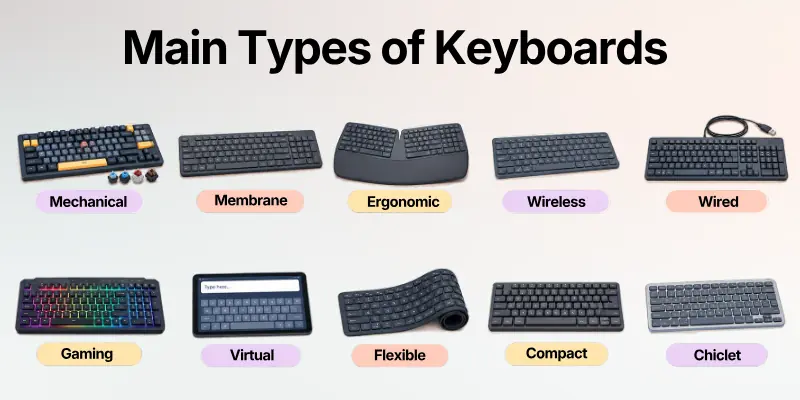
The following are some of the most common types of computer keyboards you may encounter.
1. Mechanical Keyboard
A mechanical keyboard uses individual mechanical switches beneath its keys. Each switch contains its own mechanism for registering a key press, giving users distinct tactile and responsive feedback.
Mechanical keyboards are popular among gamers, programmers, writers, and enthusiasts because they offer different switch types, customization options, and a wide range of typing feels.
Best For
- Gaming
- Programming
- Professional typing
- Long term heavy use
- Keyboard enthusiasts
Important: Mechanical keyboards can be louder and more expensive than some other keyboard types, depending on the switch and construction.
2. Membrane Keyboard
A membrane keyboard uses a pressure sensitive membrane layer to register key presses. It is one of the most common keyboard designs and is widely used for everyday computing.
Membrane keyboards are generally affordable and relatively quiet, making them suitable for home, school, and office environments.
Best For
- Everyday computer use
- Students
- Office work
- Budget conscious users
- Quiet environments
Useful Tip: If you want a simple keyboard for regular typing without advanced features, a membrane keyboard can be a practical choice.
3. Ergonomic Keyboard
An ergonomic keyboard is designed with comfort and hand positioning in mind. Some models use split layouts, curved designs, angled sections, or other shapes intended to provide a more natural typing position.
Ergonomic keyboards are particularly useful for people who spend many hours typing. However, their unusual layouts can require an adjustment period.
Main Features
- Split or curved design
- Wrist friendly positioning
- Comfortable typing angle
- Different key layouts
- Focus on long term typing comfort
Things to Remember: An ergonomic design does not automatically make a keyboard suitable for everyone. Try to choose a layout that feels natural for your hands and typing style.
4. Wireless Keyboard
A wireless keyboard connects to a computer without a traditional physical cable. Common connection methods include Bluetooth and wireless USB receivers.
Wireless keyboards can reduce cable clutter and provide greater flexibility when arranging a desk or using a keyboard from a distance.
Advantages
- Fewer cables
- Cleaner workspace
- Easy portability
- Flexible positioning
Possible Limitations
- Requires batteries or charging
- Wireless connection can occasionally be interrupted
- Performance depends on the connection technology
5. Wired Keyboard
A wired keyboard connects directly to a computer, commonly through a USB connection. It does not require a battery, making it convenient for users who prefer a simple plug and use setup.
Wired keyboards are common in offices, schools, gaming setups, and desktop computers.
Recommended: A wired keyboard is a good option if you want a straightforward connection and don’t need wireless portability.
6. Gaming Keyboard
A gaming keyboard is designed specifically for gaming and often includes features such as responsive switches, anti ghosting, programmable keys, macro support, and customizable backlighting.
Some gaming keyboards also offer dedicated media controls and software for customizing key functions.
Common Gaming Features
- Fast key response
- Anti ghosting
- N-key rollover
- Programmable keys
- Macro support
- RGB or backlighting
- Dedicated media controls
Quick Suggestion: If you only use a computer for basic typing, many gaming features may be unnecessary. Choose them when they actually benefit your workflow or gaming experience.
7. Virtual or On Screen Keyboard
A virtual keyboard is a software based keyboard displayed on a screen. Users interact with it using a touchscreen, mouse, stylus, or other pointing device.
Virtual keyboards are common on smartphones, tablets, touchscreen computers, and devices where a physical keyboard is unavailable. They can also be useful for accessibility and temporary text input.
8. Flexible Keyboard
A flexible keyboard is made from materials that allow it to bend or roll. Many flexible keyboards use silicone or similar materials and are designed for portability.
They can be convenient for travel because they take up less space and are generally easy to carry.
Best For
- Travel
- Outdoor use
- Portable setups
- Limited storage space
Flexible keyboards can also be easier to clean than some traditional keyboard designs, depending on their construction.
9. Compact Keyboard
A compact keyboard removes or reduces some keys to create a smaller overall design. Examples include 60%, 65%, 75%, and tenkeyless (TKL) keyboards. Compact keyboards are popular with users who want more desk space or a portable setup.
Common Compact Sizes
| Keyboard Size | General Description | Suitable For |
| Full size | Includes number pad and standard key groups | Office and data entry |
| TKL | Removes the dedicated number pad | Gaming and general use |
| 75% | Compact layout with function row | Productivity and small desks |
| 65% | Compact with arrow keys | Portable setups |
| 60% | Removes function row and navigation cluster | Minimalist setups |
Important Note: Smaller keyboards save space, but they may require users to access certain functions through key combinations.
10. Chiclet Keyboard
A chiclet keyboard uses flat, separated keys with small gaps between them. This design is common on laptops and some thin desktop keyboards.
Chiclet keys provide a clean appearance and relatively short key travel. They are often preferred by users who like a laptop style typing experience.
11. Scissor Switch Keyboard
A scissor switch keyboard uses a scissor like mechanism underneath each key to provide stability and short key travel.
This technology is widely associated with laptop keyboards because it allows manufacturers to create thin keyboard designs without making the keys feel completely flat.
If you like the feel of laptop keyboards, a low profile scissor switch keyboard may provide a familiar experience on a desktop.
Benefits
- Low profile design
- Short key travel
- Stable keys
- Suitable for portable devices
- Generally quiet typing
Useful Tip: If you want to check that either all the keys of your keyboard are in working condition, use any keyboard testing tool for smooth check.
12. Backlit Keyboard
A backlit keyboard includes lighting beneath or around its keys, making them easier to see in dim environments.
Some backlit keyboards use simple illumination, while others offer customizable RGB lighting with different colors and effects. Backlighting can be useful for late night work, gaming, and low light environments.
13. Multimedia Keyboard
A multimedia keyboard includes additional keys or controls for functions such as volume adjustment, media playback, mute, and sometimes application launching.
These extra controls can make common media related tasks faster because users do not need to open software menus for every action.
Best For: Users who frequently listen to music, watch videos, attend online meetings, or control media while working.
14. Numeric Keypad
A numeric keypad is a keyboard or separate keypad designed primarily for entering numbers quickly. It usually contains numbers, mathematical operators, and related keys.
Standalone numeric keypads can be useful for people who work with spreadsheets, accounting software, inventory systems, or large amounts of numerical data.
Recommended: If you regularly enter numbers, a dedicated numeric keypad can be more convenient than the number row above the letters.
Keyboard Types by Layout
Keyboard type and keyboard layout are not always the same thing. A keyboard can be mechanical, wireless, or ergonomic while still using a particular layout. A keyboard layout determines the arrangement of letters, numbers, symbols, and other keys.
QWERTY Keyboard
QWERTY is the most widely recognized keyboard layout and is commonly used for English language typing. Its name comes from the first six letters in the top alphabet row.
It is available on many keyboard types, including mechanical, membrane, wireless, ergonomic, and gaming keyboards.
AZERTY Keyboard
AZERTY is a keyboard layout commonly associated with French language typing. Some letter and punctuation positions differ from the QWERTY layout.
Users familiar with QWERTY may need time to adjust when switching to AZERTY.
DVORAK Keyboard
Dvorak is an alternative keyboard layout designed with a different arrangement of letters from QWERTY.
It is intended to provide an alternative typing experience, although QWERTY remains much more common in everyday computing.
QWERTZ Keyboard
QWERTZ is another keyboard layout used in certain European countries. One notable difference from QWERTY is the positioning of the Y and Z keys.
Things to Remember: Layouts such as QWERTY, AZERTY, DVORAK, and QWERTZ describe key arrangement rather than the keyboard’s physical technology.
Types of Keyboards by Connectivity
Another simple way to classify keyboards is by how they connect to a computer or other device.
| Connectivity Type | How It Connects | Main Benefit | Common Use |
| Wired USB | USB cable | Simple and reliable | Desktop computers |
| Bluetooth | Bluetooth connection | Cable free setup | Laptops and tablets |
| Wireless USB | USB receiver | Flexible connection | Home and office |
| PS/2 | Dedicated PS/2 port | Traditional wired connection | Older desktop systems |
Modern computers commonly rely on USB and wireless technologies, while PS/2 is now mainly associated with older systems and some specialized desktop hardware.
Quick Tip: Before buying a keyboard, check which connection types your computer or device supports.
Types of Keyboards by Size
Keyboard size can have a major effect on desk space, portability, and available keys.
Full Size Keyboard
A full size keyboard normally includes the complete set of alphanumeric keys, function keys, navigation keys, and a dedicated numeric keypad.
It is especially useful for office work and numerical data entry.
Tenkeyless Keyboard
A tenkeyless keyboard, commonly called TKL, removes the dedicated numeric keypad while keeping most other standard key groups.
It provides a balance between functionality and reduced desk size.
60% Keyboard
A 60% keyboard is significantly smaller because it removes dedicated function and navigation keys along with the numeric keypad.
Many of these functions can still be accessed through key combinations.
Compact and Portable Keyboards
Compact keyboards are designed for users who prioritize portability or desk space. They can be particularly useful for travel, small workstations, and minimalist setups.
Useful Tip: Don’t automatically choose the smallest keyboard. If you regularly use a numeric keypad or dedicated navigation keys, a larger layout may save time.
Mechanical vs. Membrane vs. Scissor Switch Keyboards
The key mechanism strongly affects how a keyboard feels when typing. The following comparison can help you understand the main differences.
| Feature | Mechanical | Membrane | Scissor Switch |
| Key feel | Tactile and varied | Softer | Short and stable |
| Noise | Low to high | Usually low | Usually low |
| Durability | Generally high | Moderate | Generally good |
| Customization | Often high | Limited | Limited |
| Typical design | Desktop | Desktop | Laptops/low profile |
| Price range | Budget to premium | Usually affordable | Budget to premium |
| Best for | Gaming, typing, enthusiasts | Everyday use | Portable typing |
The best choice depends on your preferences rather than a universal ranking. Mechanical keyboards emphasize switch feel and customization, membrane keyboards prioritize affordability and simplicity, while scissor switch designs are popular for thin and compact devices.
Important: Keyboard technology is only one part of the buying decision. Size, layout, connectivity, ergonomics, and intended use also matter.
Which Type of Keyboard Is Best for You?
The ideal keyboard depends on what you use your computer for. A gamer may have very different requirements from a student, writer, programmer, or office employee.
| User Type | Recommended Keyboard | Why |
| Student | Membrane or compact | Affordable and practical |
| Office worker | Ergonomic or membrane | Comfort and quiet typing |
| Gamer | Mechanical or gaming | Fast response and customization |
| Programmer | Mechanical or ergonomic | Comfort and frequent shortcuts |
| Writer | Mechanical or ergonomic | Typing feel and comfort |
| Traveler | Compact or flexible | Portable and space saving |
| Data entry user | Full size | Dedicated numeric keypad |
| Tablet user | Bluetooth keyboard | Wireless convenience |
Recommended: Start with your main activity, then choose the keyboard features that support it. This approach is usually better than choosing a keyboard based only on appearance or popularity.
How to Choose the Right Keyboard
Choosing among the different types of keyboards can seem confusing, especially when manufacturers use terms related to switches, layouts, sizes, and connectivity. Use the following factors to narrow down your options.
1. Identify Your Main Use
First, decide whether you mainly need the keyboard for typing, office work, gaming, programming, travel, or general computer use. Your primary activity should guide most of your other decisions.
2. Choose the Right Size
Think about how much desk space you have and which keys you actually use. If you work with numbers frequently, a full size keyboard may be preferable. If space is limited, a TKL or compact keyboard can be more practical.
3. Consider Key Feel
Some users prefer soft and quiet keys, while others enjoy tactile or clicky feedback. Try different switch technologies if possible before making a long term purchase.
4. Decide on Connectivity
Choose between wired USB, Bluetooth, and wireless USB based on your setup. A wired keyboard can simplify connectivity, while wireless options provide a cleaner and more flexible workspace.
5. Think About Comfort
If you type for several hours each day, comfort should be a major priority. Consider keyboard height, wrist position, key spacing, layout, and whether an ergonomic design would suit your typing style.
6. Set a Budget
Keyboard prices vary from inexpensive basic models to premium mechanical and ergonomic designs. Decide which features actually matter to you before paying extra for advanced features.
Things to Remember: A more expensive keyboard is not necessarily the best keyboard for you. The right choice is the one that fits your tasks, comfort requirements, workspace, and budget.
Keyboard Buying Checklist
Before purchasing a keyboard, use this quick checklist to make a more informed decision:
- Identify your primary use.
- Choose the appropriate keyboard size.
- Decide between wired and wireless connectivity.
- Select a suitable key mechanism.
- Check the keyboard layout.
- Consider typing comfort.
- Check compatibility with your device.
- Consider noise level.
- Decide whether you need a numeric keypad.
- Check whether backlighting is useful.
- Consider programmable or multimedia keys.
- Compare durability and build quality.
- Stay within your budget.
Useful Tip: If possible, test the keyboard before buying it. The same keyboard type can feel very different depending on its keycaps, switches, layout, and construction.
Advantages of Choosing the Right Keyboard Type
Choosing the right keyboard can make everyday computer interaction more comfortable and efficient.
A suitable keyboard may improve typing comfort, provide faster access to shortcuts, reduce unnecessary hand movement, and make your workspace more organized.
For gamers and professionals, specialized features such as programmable keys, responsive switches, and customizable controls can also support specific workflows.
Quick Suggestion: Focus on the features you will use every day. A simple keyboard with the right layout can be more useful than a feature heavy keyboard that does not match your workflow.
Conclusion
There are many types of keyboards, and each one is designed to meet different needs. Mechanical keyboards focus on responsive switches and customization, membrane keyboards offer affordability and simplicity, ergonomic keyboards prioritize comfort, while wireless and compact keyboards provide flexibility and portability.
Other options, such as gaming, virtual, flexible, chiclet, scissor switch, backlit, and multimedia keyboards, offer specialized features for particular users and environments.
Ultimately, the best keyboard is not necessarily the most expensive or feature rich model. It is the one that provides the right combination of comfort, size, layout, key feel, connectivity, functionality, and price for your specific needs.
FAQs About Types of Keyboards
Choosing between different keyboard types can be confusing because keyboards can be classified by technology, layout, size, connectivity, and purpose. These FAQs cover some of the most common questions users ask before selecting a keyboard.
1. How many types of keyboards are there?
There is no single official number because keyboards can be classified in different ways. Common categories include mechanical, membrane, ergonomic, wireless, wired, gaming, virtual, flexible, compact, chiclet, scissor switch, backlit, and multimedia keyboards.
2. What are the main types of keyboards?
The most common types include:
- Mechanical keyboards
- Membrane keyboards
- Ergonomic keyboards
- Wireless keyboards
- Wired keyboards
- Gaming keyboards
- Virtual keyboards
- Flexible keyboards
3. Which keyboard type is best for typing?
Mechanical and ergonomic keyboards are popular choices for frequent typists, but the best option depends on personal preference. A membrane or scissor switch keyboard may be preferable if you want a quieter and softer typing experience.
4. What is the difference between a mechanical and membrane keyboard?
A mechanical keyboard uses individual switches beneath its keys, while a membrane keyboard uses a pressure sensitive membrane. Mechanical keyboards generally provide more distinct feedback and customization, whereas membrane keyboards are often simpler and more affordable.
5. Is a wireless keyboard better than a wired keyboard?
Neither is universally better. Wireless keyboards offer flexibility and less cable clutter, while wired keyboards provide a direct connection without requiring battery charging.
6. What type of keyboard is best for gaming?
Mechanical and dedicated gaming keyboards are common choices for gamers because they can offer responsive switches, anti ghosting, programmable keys, and other gaming focused features.
7. What keyboard is best for office work?
For office work, a quiet membrane, scissor switch, or ergonomic keyboard can be a practical choice. If you type for long periods, comfort and wrist positioning should be important considerations.
8. What are the common keyboard layouts?
Some well known keyboard layouts include:
- QWERTY – widely used for English typing.
- AZERTY – commonly associated with French language typing.
- QWERTZ – used in some European regions.
- Dvorak – an alternative keyboard layout.
9. What is a TKL keyboard?
TKL stands for Tenkeyless. A TKL keyboard removes the dedicated numeric keypad from a standard full size keyboard while keeping most other important keys.
10. How do I choose the right keyboard?
Follow these simple steps:
- Identify what you use the keyboard for.
- Choose a suitable size and layout.
- Decide between wired and wireless.
- Compare mechanical, membrane, or scissor switch technology.
- Consider comfort and noise.
- Check compatibility and price.
- Choose the features you will actually use.
These points will help you to choose the right keyboard as per your work need.



- Be Respectful
- Stay Relevant
- Stay Positive
- True Feedback
- Encourage Discussion
- Avoid Spamming
- No Fake News
- Don't Copy-Paste
- No Personal Attacks
- Be Respectful
- Stay Relevant
- Stay Positive
- True Feedback
- Encourage Discussion
- Avoid Spamming
- No Fake News
- Don't Copy-Paste
- No Personal Attacks
