How Much Storage Do You Need on a Laptop?
Published: 19 Oct 2026
Choosing the right laptop storage can feel confusing. You may see options such as 128GB, 256GB, 512GB, 1TB, and even 2TB. But which one is actually right for you?
The answer depends on what you do with your laptop. A student who mainly uses Word and a web browser needs much less space than a gamer or video editor.
This tutorial explains how much storage you need on a laptop in simple terms. You will learn which storage size fits school, work, gaming, photos, videos, and everyday use.
Quick Answer: How Much Storage Do You Need?
For most people, 512GB is a good starting point. It gives you enough room for apps, documents, photos, videos, and other files without making the laptop unnecessarily expensive.
If you only perform simple tasks, 256GB may work. If you play large games or store lots of videos, 1TB or more may be a better choice.
Quick Storage Guide
| Storage | Best For | Overall Rating |
| 128GB | Basic browsing and light use | Limited |
| 256GB | Students and basic work | Good |
| 512GB | Most users | Excellent |
| 1TB | Gamers and creators | Very Good |
| 2TB+ | Heavy creative work | For power users |
Important Note: The storage shown on a laptop is not the same as the free space you will have after installing the operating system and applications.
What Is Laptop Storage?
Laptop storage is the space where your computer saves files and programs. It holds your operating system, applications, photos, videos, games, and documents.
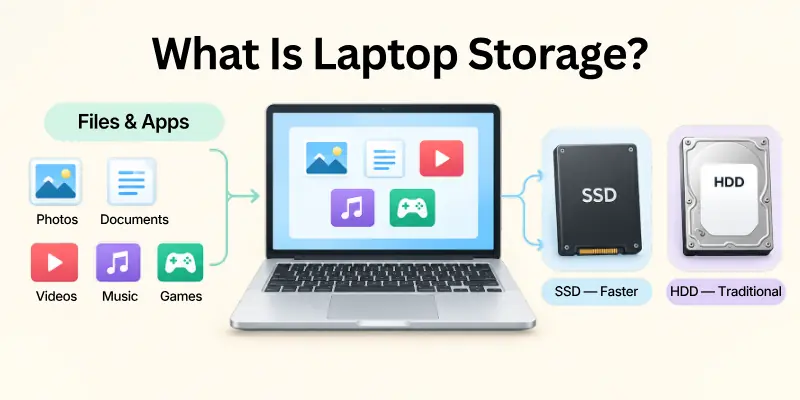
Today, most new laptops use SSDs. An SSD is usually faster and more responsive than an older HDD.
Understanding your laptop storage capacity can help you avoid buying too little or paying for more space than you need.
What Uses Laptop Storage?
Your storage may contain:
- Windows or another operating system
- Apps and software
- Documents and school files
- Photos
- Videos
- Music
- Games
- Downloads
- Temporary files
- Backups
Things to Remember: Storage is like a closet. The bigger it is, the more things you can keep without constantly removing old files.
128GB vs 256GB vs 512GB vs 1TB
Storage sizes can look simple, but the difference becomes important when you start saving large files.
A small storage drive can fill up quickly. A larger drive gives you more freedom to keep files and install applications.
Storage Size Comparison
| Storage Size | Best Use | Main Benefit | Main Problem |
| 128GB | Basic tasks | Lower price | Fills quickly |
| 256GB | School and office | Affordable | Limited for large files |
| 512GB | General use | Great balance | Costs more than 256GB |
| 1TB | Gaming and creative work | Lots of space | Higher price |
| 2TB | Professional use | Very large capacity | Often unnecessary |
For most buyers, 512GB offers the best balance between price and space.
Is 128GB Enough for a Laptop?
A 128GB laptop can be enough if you mainly browse the internet, write documents, stream videos, and use lightweight applications.
However, the available space will be much lower than 128GB after the operating system and other software are installed.
Choose 128GB If You:
- Mostly browse the web
- Use cloud storage
- Write simple documents
- Stream music and videos
- Do not install many apps
- Rarely save large files
Suggestion: Choose 128GB only if your storage needs are very light. For a laptop you plan to keep for several years, 256GB or more is usually more comfortable.
Is 256GB Enough for a Laptop?
For many students and office users, 256GB is enough for a laptop. It can handle documents, web browsing, video calls, and normal applications.
The problem begins when you save lots of photos, videos, games, or large software packages.
256GB Is Good For:
- Schoolwork
- College assignments
- Microsoft Office
- Web browsing
- Online classes
- Light photo editing
- Basic business work
Important Point: If you often download large files, 256GB may start feeling small sooner than expected.
Is 512GB Enough for a Laptop?
For most people, 512GB is enough for a laptop. It gives you a comfortable amount of space for everyday files and applications.
It is also a good choice if you want a laptop that can serve you for several years without constantly worrying about free space.
512GB Works Well For:
- Students
- Office workers
- Remote workers
- Casual gamers
- Photo users
- Everyday laptop users
- Moderate software use
Best overall choice: 512GB is the storage size I would recommend for most general laptop buyers.
Is 1TB Enough for a Laptop?
For gamers, photographers, video editors, and other heavy users, 1TB is enough for a laptop in many cases.
A 1TB SSD provides much more room for large games, high resolution videos, creative projects, and large software packages.
1TB Is Ideal For:
- Gaming
- Video editing
- Photography
- Music production
- Large software projects
- Large media libraries
- Professional work
Useful Tip: If you work with 4K video or very large project files, even 1TB can fill faster than you expect.
How Much SSD Storage Do You Need?
When deciding how much SSD storage do I need, think about both your current needs and your future needs. Buying a little extra storage can be useful because your files and applications often grow over time.
Simple SSD Recommendation
Light user: 256GB
Average user: 512GB
Gamer: 1TB
Creative professional: 1TB to 2TB+
Important Note: SSDs are generally preferred for modern laptops because they provide fast storage performance and have no moving parts like traditional HDDs.
SSD vs HDD Storage
The difference between SSD and HDD storage is important when buying a laptop. An SSD generally provides faster startup and application loading. HDDs can offer lots of storage for less money, but they are slower and are less common as the main storage option in modern thin laptops.
SSD vs HDD Comparison
| Feature | SSD | HDD |
| Speed | Fast | Slower |
| Moving Parts | No | Yes |
| Noise | Silent | Can make noise |
| Durability | Generally better for mobile use | More sensitive to movement |
| Laptop Experience | Faster | Slower |
| Best Use | Main laptop storage | Large low cost storage |
Recommendation: For a modern laptop, an SSD is usually the better choice. If you need lots of inexpensive storage, an external HDD can still be useful.
256GB vs 512GB Laptop
The 256GB vs 512GB laptop decision is one of the most common storage questions. Choose 256GB if your budget is tight and your files are mostly small. Choose 512GB if you want more freedom and plan to keep the laptop for several years.
Which One Should You Pick?
| Your Situation | Better Choice |
| Basic browsing | 256GB |
| Schoolwork | 256GB |
| College | 256GB or 512GB |
| Office work | 512GB |
| Many photos | 512GB |
| Casual gaming | 512GB |
| Heavy gaming | 1TB |
| Video editing | 1TB+ |
512GB vs 1TB Laptop
The 512GB vs 1TB laptop choice depends mostly on how many large files you keep. For normal users, 512GB is usually enough. Gamers and creators may prefer 1TB because modern games and media projects can use a lot of space.
Quick Decision
Pick 512GB if:
- You use normal applications.
- You save moderate files.
- You want better value.
- You use cloud storage.
Pick 1TB if:
- You install many games.
- You edit videos.
- You store many photos.
- You work with large files.
Things to Note: More storage does not automatically make a laptop faster. Storage type, processor, RAM, and other hardware also affect performance.
Laptop Storage for Students and College
Students usually need storage for documents, presentations, PDFs, online classes, and applications. For laptop storage for students, 256GB can work well, while 512GB offers more breathing room.
Student Storage Checklist
- Documents
- PDFs
- Presentations
- Research files
- Browser downloads
- Online learning apps
- Photos
- Personal files
For laptop storage for college, 512GB is a strong choice if the laptop will be used throughout several years of study.
Student Tip: Cloud storage can reduce the amount of local storage you need, especially for documents and school projects.
Laptop Storage for Gaming
Games can take up a lot of space. Installing several large games can fill a small drive surprisingly quickly.
For laptop storage for gaming, 1TB is a comfortable option for many gamers. Casual players may be fine with 512GB.
Gaming Storage Guide
| Gaming Style | Recommended Storage |
| Very light gaming | 256GB |
| Casual gaming | 512GB |
| Regular gaming | 1TB |
| Large game library | 1TB to 2TB |
| Game creation | 1TB+ |
Gaming Tip: Check the storage requirements of the games you actually play. Some modern games can require a very large amount of free space.
Laptop Storage for Work
Office work usually does not require huge amounts of storage unless you work with large media files.
For laptop storage for work, 256GB may be enough for basic office tasks. However, 512GB is a better all round choice for many professionals.
Work Storage Needs
- Documents
- Spreadsheets
- Presentations
- Email files
- Business software
- PDFs
- Video meetings
- Local backups
Suggestion: If your company uses cloud services, you may need less local storage. If you regularly work with large databases or media files, consider 1TB or more.
How Much Storage Do You Need for Photos and Videos?
Photos and videos can consume storage much faster than documents. If you regularly save high resolution photos or videos locally, choosing a larger SSD can prevent storage problems.
Photo and Video Users
Light photo collection: 256GB
Large photo collection: 512GB
Regular video storage: 1TB
Video editing: 1TB to 2TB+
Important Point: Video files are often much larger than documents. If you create and store videos regularly, prioritize storage capacity.
How Much Storage Do You Need for Gaming?
Gaming storage depends on the number and size of games you install. A person who plays only a few games can manage with 512GB, while someone with a large game library may prefer 1TB or more.
Gaming Checklist
- Check game installation sizes
- Count your current games
- Consider future games
- Leave free space for updates
- Consider an external SSD if needed
Things to Remember: Game updates can also require temporary free space, so do not plan to use every last GB on your drive.
Laptop Storage Requirements by User
Different users have very different storage needs. There is no single storage size that is perfect for everyone. Your daily activities should guide your decision.
User Based Storage Guide
| User Type | Recommended Storage |
| Basic user | 256GB |
| Student | 256GB to 512GB |
| Office worker | 512GB |
| Professional | 512GB to 1TB |
| Gamer | 1TB |
| Photographer | 1TB |
| Video editor | 1TB to 2TB+ |
| Heavy creator | 2TB+ |
How to Save Laptop Storage
Even a large SSD can become full if you keep unnecessary files. Good storage habits can help you get more useful space from the laptop you already own.
Storage Saving Checklist
- Delete unused applications
- Remove old downloads
- Empty the recycle bin
- Move large files to external storage
- Use cloud storage
- Delete duplicate files
- Review large videos
- Remove old installation files
Useful Tip: Check your storage every few months. Finding large unused files early can save you from a storage emergency later.
What About a Laptop Storage Upgrade?
Some laptops allow a laptop storage upgrade, while others have storage that cannot be replaced easily.
Before buying a laptop, check whether its SSD can be replaced or whether an additional storage slot is available.
Before Buying, Check:
- Is the SSD replaceable?
- Is there an additional SSD slot?
- What storage interface does it use?
- Does the manufacturer allow upgrades?
- Is the storage soldered to the motherboard?
Buying Tip: If you are unsure about future storage upgrades, buying 512GB or 1TB from the beginning can be safer than assuming you can upgrade later.
Four Simple Storage Choices
If all these numbers still feel confusing, use one of these four simple choices.
Variant 1: Basic User
Choose 256GB if you mainly browse, study, write documents, and stream content.
Variant 2: Average User
Choose 512GB if you want a balanced laptop for work, study, photos, apps, and everyday use.
Variant 3: Gamer or Creator
Choose 1TB if you install large games, edit photos, create videos, or store many large files.
Variant 4: Power User
Choose 2TB or more if you regularly handle large professional projects, extensive video libraries, or large datasets.
Final Storage Buying Checklist
Before choosing your laptop, use this simple checklist.
Storage Decision Checklist
- Know what you use your laptop for
- Estimate your current file size
- Think about future storage needs
- Check whether the laptop uses an SSD
- Check upgrade options
- Compare 256GB and 512GB prices
- Consider 1TB for gaming or creative work
- Do not pay for storage you will never use
Final Recommendation: For most people, 512GB SSD storage is the safest all around choice. Go for 256GB when your needs are light, and consider 1TB or more when you regularly handle games, videos, photos, or other large files.
Conclusion: How Much Storage Do You Really Need?
Choosing laptop storage becomes much easier when you focus on your actual needs instead of simply choosing the biggest number. For most users, 512GB SSD storage is a strong balance between space, speed, price, and future use.
If your needs are light, 256GB can work well. Gamers and content creators may benefit from 1TB, while professionals working with very large files may need 2TB or more.
Quick Recommendation
| User Type | Recommended Storage |
| Basic user | 256GB |
| Student | 256GB to 512GB |
| Everyday user | 512GB |
| Gamer | 1TB |
| Content creator | 1TB to 2TB+ |
Before You Buy
- Check what you will use the laptop for
- Estimate your current storage needs
- Think about future files and applications
- Choose SSD storage when possible
- Check whether the storage can be upgraded
Final Thought: The best laptop storage is not the largest one. It is the size that gives you enough room today while leaving some space for tomorrow.
The best storage choice is not always the biggest one. Choose enough space for your real needs, leave room for future growth, and avoid paying extra for capacity you may never use.
Frequently Asked Questions
The questions below cover some of the most common concerns buyers have when choosing laptop storage. Each answer is kept short so you can quickly find the information you need.
Understanding storage capacity can help you choose a laptop that fits your apps, files, games, and everyday needs.
These FAQs also explain common storage sizes such as 256GB, 512GB, and 1TB, along with SSD and HDD options.
1. How much storage do I need on a laptop?
For most users, 512GB is a good choice. Light users may be comfortable with 256GB.
Your storage needs depend on how you use your laptop and how many files you keep locally. Students and office users may need less space, while gamers and creators often need more.
2. Is 256GB enough for a laptop?
Yes. It can be enough for students, office work, browsing, and basic applications.
However, available space will decrease as you install programs and save photos, videos, and documents. Cloud storage or an external drive can provide extra room when needed.
3. Is 512GB enough for a laptop?
Yes. 512GB is suitable for most everyday users and many professionals.
It provides more flexibility for applications, documents, media files, and other data. It can also reduce the need to manage free space frequently.
4. Is 1TB enough for a laptop?
Yes. 1TB is a strong option for gamers, creators, and people with large file collections.
This capacity gives you plenty of room for large games, videos, project files, and other data. It can be useful if you want to keep more files on the laptop instead of using external storage.
5. Is 128GB enough for a laptop?
It can work for very light use, but 128GB can become limiting quickly.
The operating system and installed applications already use some of this space. If you store many photos, videos, or large programs, a larger storage capacity may be more practical.
6. Is an SSD better than a HDD for a laptop?
For most modern laptops, an SSD is preferred because it is faster and has no moving parts.
An SSD can provide quicker startup times and faster file access. HDDs can still offer large capacity at a lower cost, but they are generally slower and less common in newer laptops.
7. How much storage do students need?
Most students can choose 256GB or 512GB. The right choice depends on their files and applications.
For documents, web browsing, online classes, and basic software, these capacities can be suitable. Students working with videos, design projects, or large datasets may need additional space.
8. How much storage does gaming need?
Casual gaming can work with 512GB, while 1TB is better for larger game libraries.
Modern games can take up a large amount of storage space, so gamers should check the requirements of the games they plan to install. Extra storage can also help avoid uninstalling games frequently.
9. Is 512GB better than 256GB?
Yes, if you need more room for apps, games, photos, videos, and future files.
The larger capacity gives you more free space as your collection grows. It can also make storage management easier for users who regularly download or create large files.
10. Do I need 1TB storage for normal use?
Usually not. 512GB is enough for many normal users.
If you mainly browse the web, use office applications, stream media, and store a moderate number of files, 512GB may provide a comfortable balance. Your personal file habits should still guide the final choice.
11. Can I upgrade laptop storage later?
Sometimes. It depends on the laptop model and whether its SSD is replaceable.
Some laptops have an accessible M.2 or other storage slot, while others use storage that cannot be upgraded easily. Always check the laptop specifications before buying with a future upgrade in mind.
12. How can I get more laptop storage?
You can delete unnecessary files, use cloud storage, add an external SSD, or upgrade the internal SSD when supported.
Choosing the right option depends on your laptop and how much additional space you need. Regularly removing unused files can also help you make better use of your existing storage.
13. How much storage do I need for photos and videos?
Light users may need 256GB or 512GB. Heavy photo and video users should consider 1TB or more.
High resolution photos and videos can consume storage quickly, especially when working with 4K or other large video files. An external SSD or cloud backup can provide additional space for large media collections.
14. Does more storage make a laptop faster?
Not by itself. Storage type and speed, RAM, processor, and other hardware also affect performance.
An SSD can make a laptop feel faster than a traditional HDD because it provides quicker data access. However, increasing capacity alone does not automatically improve overall system performance.
15. What is the best laptop storage size?
For most people, a 512GB SSD is the best balance of capacity, flexibility, and value.
It provides enough room for everyday applications, documents, photos, and many other files. Users with very large game libraries or media collections may need 1TB or more.




- Be Respectful
- Stay Relevant
- Stay Positive
- True Feedback
- Encourage Discussion
- Avoid Spamming
- No Fake News
- Don't Copy-Paste
- No Personal Attacks
- Be Respectful
- Stay Relevant
- Stay Positive
- True Feedback
- Encourage Discussion
- Avoid Spamming
- No Fake News
- Don't Copy-Paste
- No Personal Attacks
