What Do CPU, RAM, SSD, and GPU Mean on a Laptop?
Published: 2 Sep 2026
Buying a laptop can feel confusing when you see words like CPU, RAM, SSD, and GPU. These are some of the most important parts of a laptop, and each one has a different job. If you understand what they do, it becomes much easier to understand laptop specs and choose a laptop that fits your needs.
In this guide, we will explain CPU, RAM, SSD, and GPU in simple language. You will learn what each component does, how they work together, and how they affect laptop speed, storage, multitasking, gaming, and everyday use. By the end, you should have a much better idea of how to read laptop specifications before buying a new laptop.
Quick Tip: You do not always need the most expensive laptop. The best laptop is the one with the right specifications for the way you plan to use it.
What are CPU, RAM, SSD, and GPU?
CPU, RAM, SSD, and GPU are different laptop hardware components. Think of a laptop as a small team where every member has a different job. The CPU handles instructions, RAM holds information that you are currently using, the SSD stores your files and programs, and the GPU handles graphics and visual tasks.
| Component | What It Does | Why It Matters |
| CPU | Processes instructions and runs tasks | Affects overall processing performance |
| RAM | Temporarily holds active data | Helps with multitasking and smooth performance |
| SSD | Stores files, apps, and the operating system | Affects storage capacity and loading speed |
| GPU | Processes images, video, and graphics | Important for gaming and graphics-heavy work |
These four components work together to affect laptop performance. A powerful CPU cannot fix every problem, just as having a large SSD does not automatically make a laptop fast. Understanding the role of each component helps you decide which specifications matter most for school, office work, gaming, video editing, or everyday tasks.
Simple Rule: CPU = processing, RAM = working space, SSD = storage, and GPU = graphics.
What Is a CPU in a Laptop?
The CPU in a laptop is the main processor of the computer. CPU stands for Central Processing Unit. It receives instructions from software and performs the calculations needed to make programs work.
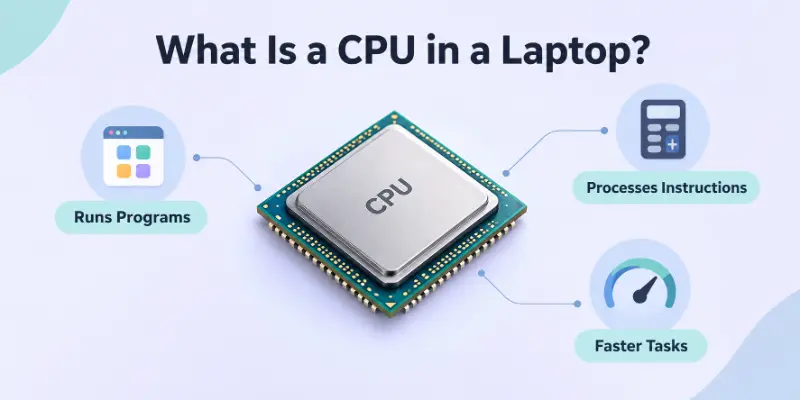
You can think of the CPU as the brain of your laptop. When you open an app, browse the web, write a document, or perform a calculation, the CPU helps process those instructions. A faster and more capable processor can make many tasks feel smoother and more responsive.
CPU Meaning and Processor Meaning
The terms CPU and processor are often used to mean the same thing. When someone talks about a laptop processor, they are usually talking about the CPU inside the laptop.
Modern processors can have multiple cores. A CPU with several cores can handle multiple tasks at the same time more efficiently. Clock speed is another specification you may see when comparing processors, although a higher clock speed alone does not always mean a better CPU.
Important: Do not choose a laptop based only on CPU clock speed. Processor generation, architecture, core count, and the type of tasks you perform also matter.
What Makes a Laptop CPU Good?
A good CPU depends on what you want to do with the laptop. Basic users may not need a high-end processor for browsing, documents, streaming, and email. Students and office users can usually choose a mid-range processor, while gamers and creators may benefit from a more powerful CPU.
If you are comparing laptop CPU cores and clock speed, remember that specifications should be considered together rather than separately.
What Is RAM in a Laptop?
RAM stands for Random Access Memory. It is the short-term working memory of your laptop. When you open applications, browser tabs, documents, or games, the laptop uses RAM to keep the information it needs quickly available.
Unlike an SSD, RAM is not designed to permanently store your files. When you turn off the laptop, the information stored in RAM is cleared. This is why RAM is sometimes described as temporary memory.
Why Does Laptop RAM Matter?
The amount of RAM in a laptop can have a big effect on multitasking. If you have enough RAM, you can switch between applications and browser tabs more comfortably. If you do not have enough, your laptop may become slow when you try to run many things at once.
For example, a student might have a browser, word processor, PDF reader, and video call open at the same time. More RAM can help the laptop handle this type of multitasking more smoothly.
How Much RAM Do I Need?
The answer depends on how you use your laptop. Basic everyday tasks require less RAM than gaming, programming, video editing, or other demanding workloads.
| Usage | General RAM Consideration |
| Web browsing and basic tasks | Lower capacity may be enough |
| School and office work | Moderate capacity is recommended |
| Heavy multitasking | More RAM is helpful |
| Gaming and creative work | Higher capacity may be useful |
| Professional workloads | Higher capacity may be necessary |
Things to Remember: More RAM is useful only when your workload needs it. Buying extra RAM does not automatically make every laptop faster.
What Is an SSD in a Laptop?
An SSD, or Solid-State Drive, is the main storage device in many modern laptops. It stores your operating system, applications, photos, videos, documents, and other files.
The SSD in a laptop is different from RAM because an SSD keeps your data even after you turn off the laptop. SSDs also have no traditional spinning disks, which helps them provide fast access to stored data.
Why Is SSD Storage Important?
Your laptop’s storage determines how much data you can keep. A larger SSD gives you more space for applications, photos, videos, games, and documents.
SSD speed can also affect how quickly your laptop starts and how fast applications and files load. This is one reason modern laptops with SSDs often feel much more responsive than older computers that use traditional hard drives.
SSD vs HDD: What Is the Difference?
An HDD uses spinning magnetic disks to store information, while an SSD uses flash memory. SSDs are generally faster, quieter, and more resistant to movement because they have no moving parts.
For many modern laptops, an SSD is the better choice because fast storage can improve everyday responsiveness.
Recommended: If you are choosing between a modern SSD and an older HDD for everyday laptop use, an SSD is generally the better option.
What Is an NVMe SSD?
NVMe is a technology used by many modern SSDs to communicate with a computer efficiently. You may see the term NVMe SSD when comparing laptop storage options.
You do not need to understand every technical detail of NVMe to choose a laptop. The important point is that modern NVMe-based storage can provide very fast performance, especially compared with older storage technologies.
What Is a GPU in a Laptop?
GPU stands for Graphics Processing Unit. The GPU in a laptop is designed to process images, videos, animations, and other visual information.
The GPU is especially important for gaming, 3D applications, video editing, graphic design, and other workloads that require strong graphics performance. Some laptops use graphics built into the processor, while others have a separate graphics processor.
Integrated GPU vs Dedicated GPU
An integrated GPU shares resources with the rest of the system and is often built into the CPU or processor platform. It can be suitable for everyday tasks, streaming, office work, and many lighter graphics workloads.
A dedicated GPU, on the other hand, is a separate graphics processor designed to provide stronger graphics performance. It is commonly found in gaming laptops and laptops designed for demanding creative work.
| Graphics Type | Best For |
| Integrated GPU | Everyday use, study, office work, streaming |
| Dedicated GPU | Gaming, 3D work, advanced video editing, graphics-heavy tasks |
Think About It: If you mainly browse the internet and work with documents, you may not need a powerful dedicated GPU. If you want to play demanding games, graphics performance becomes much more important.
CPU vs RAM vs SSD vs GPU: What Is the Difference?
The easiest way to understand the difference between these components is to think about their jobs. The CPU processes instructions. RAM provides temporary working space for active programs.
The SSD stores your files and software. The GPU handles graphics and visual calculations. Together, these components help determine how your laptop performs.
CPU vs RAM
CPU vs RAM is not really a competition because they perform different jobs. The CPU processes instructions, while RAM gives the CPU and applications quick access to information they are currently using.
A laptop needs both. A powerful CPU with too little RAM can struggle with heavy multitasking, while plenty of RAM cannot turn a weak processor into a powerful one.
RAM vs Storage
RAM vs storage is another common point of confusion. RAM is temporary working memory, while SSD storage is where your files and programs are kept permanently.
For example, your photos may be stored on your SSD, but when you open an editing program, some of the information needed by that program is loaded into RAM.
CPU vs GPU
The CPU and GPU difference is mainly about the type of processing they are designed to handle. The CPU is a general-purpose processor that handles many different instructions, while the GPU is optimized for large numbers of graphics-related calculations.
Simple Rule: CPU handles general processing, while GPU specializes in graphics and parallel workloads.
How Do CPU, RAM, SSD, and GPU Work Together?
These components do not work separately. They work as a system. Imagine opening a game on your laptop. The SSD stores the game files. The CPU processes game instructions and other tasks. RAM holds the information the game needs while it is running. The GPU processes the graphics that appear on your screen.
The same idea applies to everyday tasks. When you open a browser, the SSD provides the program files, the CPU processes instructions, RAM holds active information, and the GPU helps display web content and visual elements.
Good to Know: A laptop’s overall performance depends on how its components work together, not on one specification alone.
What Makes a Laptop Fast?
Many people ask, “what makes a laptop fast?” The answer is not simply the CPU, RAM, or SSD. Several components and factors work together to determine how responsive a laptop feels.
A capable CPU, enough RAM, and a fast SSD can make everyday tasks feel smooth. For gaming and graphics-heavy applications, the GPU becomes much more important. Software optimization, cooling, and the laptop’s overall design can also affect performance.
What Affects Laptop Speed?
Some of the main factors that affect laptop speed and performance include:
- CPU performance
- Amount of RAM
- SSD speed and capacity
- GPU performance
- Software and operating system
- Cooling and thermal performance
- The type of tasks you perform
Warning: Do not compare laptops by looking at only one number. A laptop with a newer CPU but insufficient RAM or storage may not be the best choice for your needs.
How to Read Laptop Specifications
Learning how to understand laptop specs can make shopping much easier. When you see a laptop listing, start by looking at the CPU, RAM, storage, and GPU. Then think about what you actually plan to do with the laptop.
For example, a person who only needs a laptop for web browsing and schoolwork does not need the same hardware as someone who wants to play demanding games or edit high-resolution video.
What Should You Look For?
| Specification | What to Check | Why It Matters |
| CPU | Processor model and generation | Overall processing |
| RAM | Capacity | Multitasking |
| SSD | Capacity and type | Storage and loading |
| GPU | Integrated or dedicated | Graphics performance |
| Display | Size and resolution | Viewing experience |
| Battery | Battery capacity and efficiency | Portability |
Tip: Start with your needs first, then compare specifications. Do not start with the most expensive model and assume it is automatically the best.
How Much SSD Storage Do I Need?
The amount of SSD storage you need depends on the files and applications you plan to keep on your laptop.
For basic browsing, documents, online classes, and office work, a smaller SSD may be sufficient. If you store many videos, large games, creative projects, or other large files, you will need more storage.
You should also remember that the operating system and pre-installed software already use some of the advertised storage capacity.
Things to Remember: Buying a little more storage than you currently need can help you avoid running out of space later.
Integrated vs Dedicated Graphics: Which Is Better?
Neither option is always better for every person. The right choice depends on your workload. Integrated graphics are often enough for everyday tasks, streaming, office applications, and many lighter workloads. They can also help manufacturers create laptops that are thinner, lighter, and more power-efficient.
Dedicated graphics are designed for more demanding workloads. They are useful for gaming, 3D modeling, advanced video editing, and other applications that need stronger graphics processing.
Recommended: Choose a dedicated GPU if graphics-heavy work or gaming is an important part of your laptop use. Otherwise, integrated graphics may be enough.
Which Laptop Specifications Matter Most?
There is no single answer because every user has different needs. A student may care more about battery life, portability, RAM, and storage. An office user may prioritize a comfortable keyboard and reliable performance. A gamer may care most about the CPU, dedicated GPU, display, cooling, and RAM.
For creative professionals, CPU performance, RAM, GPU power, display quality, and SSD capacity can all be important. This is why a laptop buying guide should begin with your intended use rather than simply recommending the most powerful hardware.
For Students and Everyday Users
Look for a balanced laptop with enough RAM, a modern processor, SSD storage, good battery life, and a comfortable design. You usually do not need a high-end dedicated GPU for basic schoolwork, browsing, video calls, and streaming.
For Office and Professional Work
A reliable processor, sufficient RAM, fast SSD, good display, and comfortable keyboard are important. If your work involves large spreadsheets or many applications at once, additional RAM can be helpful.
For Gaming
Gaming puts greater demands on the CPU and especially the GPU. A dedicated GPU is usually important for demanding modern games. You should also consider RAM, SSD capacity, display refresh rate, and cooling.
For Video Editing and Creative Work
Creative applications can benefit from a strong CPU, plenty of RAM, fast SSD storage, and a capable GPU. The right combination depends on the software you use and the type of projects you create.
Quick Tip: There is no universal list of the “best laptop specs.” The best specifications are the ones that match your workload and budget.
Common Mistakes When Choosing Laptop Specs
One common mistake is buying a laptop based only on the processor name. Another is assuming that more RAM automatically means a faster laptop. Storage capacity is also often confused with storage speed.
People sometimes buy a large SSD because they think it will improve every aspect of performance. A larger SSD gives you more storage space, but it does not automatically make every task faster.
Warning: Never judge a laptop by one specification alone. Always consider the CPU, RAM, SSD, GPU, display, battery, and your actual needs together.
Summing Up
Understanding CPU, RAM, SSD, and GPU makes it much easier to understand laptop specifications. The CPU processes instructions, RAM provides temporary working memory, the SSD stores your files and programs, and the GPU handles graphics.
The best laptop is not necessarily the one with the highest numbers. Instead, look for a balanced combination of components that matches your needs. Once you know what each component does, you can compare laptops with much more confidence and choose a device that gives you the performance, storage, and features you actually need.
Final Tip: Before buying a laptop, write down your main tasks first. Then choose the CPU, RAM, SSD, and GPU based on those tasks rather than paying extra for specifications you may never use.
Quick Answers for Beginners
CPU, RAM, SSD, and GPU are some of the most important hardware components in a laptop, and each one has a different role in how the computer works. The following FAQs explain the basic differences between these components in simple terms.
1. Is CPU or RAM More Important?
Neither one is automatically more important because the CPU and RAM have different jobs.
- CPU: Processes instructions and performs calculations.
- RAM: Helps your laptop handle active programs and multitasking.
- Best approach: Choose a balanced combination based on your everyday workload.
For example, a powerful CPU with too little RAM may struggle when you open many applications at once. Similarly, having lots of RAM will not make a weak CPU perform like a high-end processor.
Simple Rule: CPU affects processing power, while RAM mainly affects how comfortably your laptop handles multiple active tasks.
2. Is an SSD Better than an HDD?
For most modern laptops, an SSD is the better choice. The main reasons include:
- Faster startup times
- Quicker application loading
- Faster file access
- No spinning mechanical parts
- Quieter operation
- Better resistance to movement and physical shocks
An HDD can still provide large amounts of storage at a lower cost, but an SSD usually gives a laptop a much more responsive feel.
Recommended: If speed and everyday responsiveness are important to you, choose an SSD whenever possible.
3. Do I Need a Dedicated GPU?
Not necessarily. It depends on what you plan to do with your laptop. An integrated GPU can be enough for:
- Web browsing
- Online classes
- Office work
- Video streaming
- Basic photo editing
A dedicated GPU becomes more useful for gaming, 3D applications, advanced video editing, and other graphics-heavy workloads.
Bottom line: If you are buying a laptop mainly for everyday tasks, you may not need to spend extra money on a dedicated graphics card.
4. How Much RAM Is Enough for a Laptop?
The amount of RAM you need depends on your workload.
| Type | RAM ConsiderationUser |
| Basic browsing | Lower capacity may be sufficient |
| Students | Moderate capacity is usually suitable |
| Office users | Moderate capacity works well for most tasks |
| Heavy multitasking | More RAM can be helpful |
| Gaming | Higher capacity may be preferred |
| Video editing | More RAM is often useful |
Keep in mind that RAM requirements can change as software becomes more demanding.
Think About It: Instead of asking for the maximum amount of RAM, ask, “How many programs do I normally use at the same time?”
5. Does More Storage Make a Laptop Faster?
No, not by itself. Storage capacity tells you how much data your laptop can hold, while storage technology and speed affect how quickly that data can be accessed.
For example, upgrading from a small SSD to a larger SSD gives you more space for files and applications. However, simply having more gigabytes does not automatically make the laptop faster.
Remember:
- More storage = more space
- Faster storage = quicker data access
- More RAM = better support for active multitasking
6. What Is the Most Important Laptop Specification?
There is no single specification that is most important for every user. Your priorities should depend on what you plan to do:
- Everyday use: Focus on a balanced CPU, RAM, and SSD.
- Multitasking: Pay more attention to RAM.
- Gaming: Look closely at the GPU, CPU, RAM, and display.
- Video editing: Consider the CPU, GPU, RAM, and SSD.
- Large file storage: Choose an SSD with enough capacity.
Key Takeaway: The best laptop specifications are not necessarily the highest specifications. They are the specifications that match your needs and budget.




- Be Respectful
- Stay Relevant
- Stay Positive
- True Feedback
- Encourage Discussion
- Avoid Spamming
- No Fake News
- Don't Copy-Paste
- No Personal Attacks
- Be Respectful
- Stay Relevant
- Stay Positive
- True Feedback
- Encourage Discussion
- Avoid Spamming
- No Fake News
- Don't Copy-Paste
- No Personal Attacks
