Laptop Parts and Their Functions: A Complete Guide
Published: 31 Aug 2026
A laptop is a small computer that you can carry almost anywhere. It helps you do many things, such as studying, working, browsing the internet, watching videos, playing games, and storing important files.
But have you ever wondered what is inside a laptop and how all its parts work together? A laptop has many different components, and each one has an important job.
In this guide, we will explain the main parts of a laptop and their functions in simple language. You will learn about the CPU, RAM, SSD, GPU, motherboard, battery, screen, keyboard, touchpad, ports, and other important laptop hardware components.
What Are the Main Parts of a Laptop?
A laptop is made up of many different laptop parts. Some parts are located inside the laptop, while others are visible and easy to touch. The main parts of a laptop include:
| Internal Laptop Components | External Laptop Components |
| CPU – Processor | Keyboard |
| RAM – Memory | Touch Pad |
| SSD or HDD – Storage | WebCam & Microphone |
| GPU – Graphics Processor | Speakers |
| Motherboard | Wifi and Bluetooth Components |
| Battery | USB Ports & Connecters |
| Cooling System | Charger and Power Adapter |
| Display or Screen |
Each component has a different function. Together, these laptop components allow the computer to process information, store files, display images, connect to the internet, and perform many other tasks.
Internal Laptop Components
Internal laptop components are the parts located inside the laptop’s body. You usually cannot see them without opening the laptop. Some important internal components include:
- CPU
- RAM
- SSD or HDD
- GPU
- Motherboard
- Battery
- Cooling system
- Display or screen
These laptop hardware components work together to make the laptop run properly.
1. CPU: The Brain of the Laptop
The CPU, or Central Processing Unit, is one of the most important parts of a laptop. It is also called the processor. You can think of the CPU as the brain of the laptop. It processes instructions and helps the computer perform different tasks.
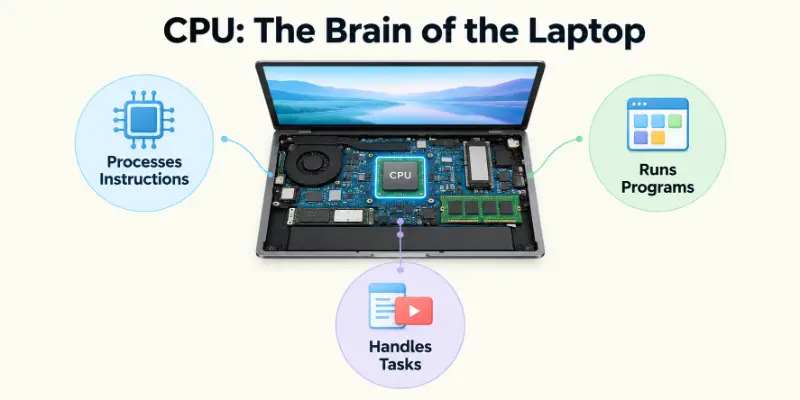
For example, when you open a program, type a document, or watch a video, the CPU processes instructions that help make these actions happen.
What Does a Laptop CPU Do?
Think of the CPU (Central Processing Unit) as the “brain” of your computer. Every time you click a mouse, type a letter, or open an app, the CPU is the part that takes your command, figures out what to do, and makes it happen. Without it, your computer wouldn’t be able to think or run any programs at all. Learn How Does a Laptop CPU Work in detail. The CPU:
- Processes instructions
- Runs applications
- Performs calculations
- Helps control other components
- Handles many everyday computer tasks
A faster and more powerful laptop processor can handle demanding tasks more easily. However, laptop performance does not depend on the CPU alone. RAM, storage, GPU, and cooling also play important roles.
2. RAM: The Laptop’s Short-Term Memory
RAM stands for Random Access Memory. It is another important part of a laptop. RAM temporarily holds the information that your laptop is currently using.
For example, imagine that you open a web browser, a Word document, and a music app at the same time. Your laptop uses RAM to keep information from these open programs ready for quick access. Check How Much RAM Do You Need For a Laptop in this detailed guide.
What Does Laptop RAM Do?
RAM helps your laptop:
- Run multiple programs
- Switch between applications
- Keep active information available
- Perform everyday tasks more smoothly
Things to Know: RAM is different from storage. RAM is temporary, while an SSD or HDD stores your files for a longer period.
3. SSD or HDD: Laptop Storage
The SSD or HDD is the storage component of a laptop. It keeps your files and programs even when the laptop is turned off.
Your photos, videos, documents, games, applications, and operating system are stored on the laptop’s storage drive. Here you can learn the difference between SSD vs HDD in detail.
What Is an SSD?
An SSD (Solid State Drive) is a modern storage device with no moving mechanical parts. SSDs are generally faster and quieter than traditional hard drives.
What Is an HDD?
An HDD (Hard Disk Drive) uses spinning disks to store data. HDDs can provide large amounts of storage, but they are generally slower than SSDs.
Key Point: If your laptop feels slow when starting Windows or opening applications, upgrading from an HDD to an SSD can sometimes make a noticeable difference.
4. GPU: The Graphics Processor
The GPU, or Graphics Processing Unit, handles many of the visual tasks on a laptop. It helps create and display images, videos, animations, and graphics. A GPU is especially important for activities such as:
- Gaming
- Video editing
- 3D design
- Animation
- Graphic design
For simple tasks such as browsing the web and working with documents, integrated graphics may be enough. More demanding tasks may benefit from a dedicated GPU. The following guide will help you to know about How to Test Laptop GPU Performance in detail.
Important: Some laptops use integrated graphics, while others have a dedicated graphics card.
5. Motherboard: The Main Board
The motherboard is the main circuit board inside a laptop. Many important laptop hardware components connect to the motherboard. It allows different parts of the computer to communicate with each other.
You can think of the motherboard like a road system. Just as roads connect different places, the motherboard provides connections between important laptop components.
Depending on the laptop design, components such as the CPU, RAM, storage, GPU, Wi-Fi hardware, and other parts may connect directly or indirectly to the motherboard.
6. Laptop Battery: Portable Power
The laptop battery provides power when your laptop is not connected to a wall outlet. This is one of the main reasons you can use a laptop in different places without keeping it plugged into a charger. This one article will tell you How to Use a Laptop Battery Correctly in easy ways.
What Affects Battery Life?
Battery life can depend on:
- Battery capacity
- Screen brightness
- Running applications
- Wi-Fi usage
- CPU and GPU workload
- Battery age
- Power settings
Remember: As a battery gets older, its capacity can decrease. Checking your laptop battery health can help you understand whether the battery is still performing well.
7. Cooling System: Keeping the Laptop Cool
A laptop produces heat when its components are working. The cooling system helps to control this heat. The cooling system can include:
- Cooling fan
- Heat sink
- Heat pipes
- Air vents
Why Is Laptop Cooling Important?
First of all Check Laptop CPU Temperature. If a laptop becomes too hot, it may slow down or become unstable. In some cases, excessive heat can also affect the lifespan of hardware.
Dust can block air vents and reduce airflow. Using a laptop on a soft surface, such as a bed or thick blanket, can also block ventilation. Keeping the laptop’s air vents clean and unobstructed can help maintain proper airflow.
8. Laptop Display or Screen
The laptop display, also called the screen, is where you see everything your computer shows you. It displays:
- Text
- Pictures
- Videos
- Websites
- Games
- Applications
Important display features include:
- Screen size
- Resolution
- Brightness
- Refresh rate
- Panel type
A damaged display may have problems such as flickering, lines, dark areas, or dead pixels.
Do you know: You can also perform an Online Laptop Touch Screen Test to look for display problems.
External Laptop Parts
External laptop parts are the components that you can normally see and touch without opening the laptop. Common external parts include:
- Keyboard
- Touchpad
- Webcam
- Speakers
- USB ports
- HDMI port
- Charging port
These parts allow you to interact with the laptop and connect it to other devices.
1. Laptop Keyboard
The laptop keyboard is an input device that allows you to type information into your computer. You can use it to:
- Type documents
- Search the internet
- Enter passwords
- Use keyboard shortcuts
- Control certain computer functions
Laptop keyboards can have different layouts depending on the manufacturer and country. If some keys stop working, you can perform a Keyboard Test to identify faulty keys.
2. Laptop Touchpad
The touchpad is the flat surface located below the keyboard on most laptops. It works like a mouse and allows you to control the pointer on the screen. You can use a touchpad to:
- Move the pointer
- Click
- Right-click
- Scroll
- Zoom
- Use multi-finger gestures
Note: A touchpad is especially useful when you do not have a separate mouse with you.
3. Webcam and Microphone
Most modern laptops include a webcam and microphone. The webcam captures video, while the microphone records sound. They are commonly used for:
- Video calls
- Online classes
- Work meetings
- Voice calls
- Recording videos
If your Webcam or Microphone is not working correctly, you can test these components through your operating system and appropriate device settings. Further, you can also check with these Online Webcam Testing Tool and an Online Microphone Testing Tool.
4. Laptop Speakers
Laptop speakers produce sound from your computer. Some laptops have stereo speakers, while others may have additional audio features designed to improve sound quality. They allow you to hear:
- Music
- Videos
- Games
- Notifications
- Voice calls
- Online meetings
If your laptop has No Sound, the problem could be related to software settings, drivers, the speakers, or another component. An Online Speaker Tester can help you to check the laptop speakers quickly.
5. Wi-Fi and Bluetooth Components
Modern laptops usually have wireless components that allow them to connect to networks and other devices.
Wi-Fi: Wi-Fi allows your laptop to connect to a wireless network and access the internet.
Bluetooth: It allows your laptop to connect wirelessly to nearby devices such as:
- Wireless headphones
- Speakers
- Mouse
- Keyboard
- Smartphones
A problem with the Wi-Fi or Bluetooth hardware, drivers, or settings can prevent wireless connections from working correctly.
6. Laptop Ports and Connectors
Laptop Ports allow you to connect your computer to external devices. Common laptop ports include USB Port, HDMI Port and Charging Port etc.
USB Ports: can connect devices such as:
- Flash drives
- External hard drives
- Mouse
- Keyboard
- Smartphones
HDMI Port: An HDMI port can be used to connect your laptop to a compatible monitor, TV, or projector.
Charging Port: The charging port connects your laptop to its power adapter. Depending on the laptop model, you may also find:
- Headphone jack
- SD card slot
- Ethernet port
- USB-C port
The exact ports available depend on the laptop model.
7. Laptop Charger and Power Adapter
A laptop charger provides electrical power to your laptop and charges its battery. The charger normally includes a power adapter and cable. A damaged charger or charging cable can cause problems such as:
- Slow charging
- No charging
- Intermittent charging
- Battery not being detected
Different laptops can require different chargers, so it is important to use a compatible charger with the correct specifications.
Internal vs External Laptop Parts
Internal parts are mostly inside the laptop, while external parts are the components you can normally see and touch.
Both groups are important. The internal components do much of the processing and storage work, while external parts allow you to interact with the computer.
Which Laptop Parts Affect Performance the Most?
Several laptop components can affect its performance.
CPU: The CPU processes instructions and handles many computer tasks.
RAM: More RAM can help when you need to run several applications at the same time, provided the laptop and operating system support the configuration.
SSD: An SSD can make starting the system and opening applications feel much faster than an older HDD.
GPU: A stronger GPU is useful for gaming, video editing, 3D work, and other graphics-heavy tasks.
Cooling System: Good cooling helps the laptop maintain stable performance, especially during demanding workloads.
Which Laptop Parts Can Be Upgraded?
Not every laptop has upgradeable components. It depends on the laptop’s design and model. Some laptops may allow upgrades or replacements for:
- RAM
- SSD/HDD
- Battery
- Wi-Fi card
However, some modern laptops have components permanently attached to the motherboard. These parts may not be easily replaceable or upgradeable.
Before buying an upgrade, always check your specific laptop model and manufacturer information.
How Can You Test Your Laptop Components?
Testing your laptop hardware can help you find problems before they become bigger issues. You can test different laptop hardware components, including:
RAM
Check your RAM for memory errors, stability issues, and unusual slowdowns. A proper memory test can help identify faulty RAM that may cause crashes, freezing, or poor laptop performance.
SSD
Test your SSD to check its health, storage performance, and read/write speeds. Monitoring the drive regularly can help you detect performance issues or signs of storage failure early.
Battery
Check your laptop battery’s health, capacity, and charging performance to see how well it is holding a charge. Battery testing can also help you identify reduced capacity or unusual battery drain.
CPU
Monitor your CPU usage, processing performance, and temperature while running everyday tasks or demanding applications. This can help you spot overheating, unusually high CPU usage, or potential performance problems.
GPU
Test your GPU to evaluate graphics performance and stability, especially when running games, video editing software, or other graphics-intensive applications. Monitoring GPU temperature can also help detect overheating issues.
Keyboard
Use an Online Keyboard Tester to check whether every key responds correctly and consistently. It can help you quickly identify unresponsive, stuck, or incorrectly working keys without installing additional software.
Display
Check your laptop display for dead pixels, flickering, brightness problems, and other visual issues. An Online LCD Screen Tester can help you examine different colors and screen areas to identify display problems more easily.
Speakers
Test your laptop’s audio output to make sure both speakers produce clear and consistent sound. An Online Speaker Tester can help you check speaker performance and identify distorted, weak, or missing audio.
Webcam
Check whether your built-in camera is working correctly and producing clear video. With an Online Webcam Tester, you can quickly verify camera operation, video quality, and whether your browser can access the webcam.
Mouse and Touchpad
Test your laptop’s mouse or touchpad to make sure clicks, movement, scrolling, and other controls respond properly. An Online Mouse Test can help identify unresponsive buttons or tracking problems.
Touch Screen
If your laptop has a touchscreen, check whether all areas respond accurately to taps and gestures. An Online Touch Screen Tester can help you find unresponsive areas or touch-detection problems.
Microphone
Test your built-in microphone to make sure it captures your voice clearly without excessive noise or interruptions. An Online MIC Tester can help you quickly check microphone input before video calls, meetings, or recordings.
Ports
Check your laptop’s USB, HDMI, audio, charging, and other ports to make sure connected devices are recognized and work properly. Testing each port can help you identify loose connections, damaged ports, or connectivity problems.
Tip: At Free Laptop Testing, you can create separate detailed guides for each of these tests and link them from this section.
Quick Summary of Laptop Parts and Their Functions
A laptop is made up of several hardware components, and each component performs a specific function that helps the computer operate properly. Some parts handle processing and storage, while others are responsible for power, cooling, display, input, and connectivity.
The table below provides a quick overview of the most important laptop components and their main functions.
| Laptop Component | Main Function |
| CPU | Processes instructions |
| RAM | Temporarily stores active information |
| SSD/HDD | Stores files and programs |
| GPU | Processes graphics |
| Motherboard | Connects important components |
| Battery | Provides portable power |
| Cooling System | Helps control heat |
| Display | Shows information and images |
| Keyboard | Allows you to type |
| Touchpad | Controls the pointer |
| Webcam | Captures video |
| Speakers | Produce sound |
| Wi-Fi | Connects to wireless networks |
| Bluetooth | Connects compatible wireless devices |
| USB/HDMI Ports | Connect external devices |
| Charger | Supplies power and charges the battery |
Understanding the function of each laptop component can help you identify the hardware responsible for different tasks. It can also make it easier to troubleshoot problems, compare laptops, and decide which components may need an upgrade or replacement.
Ending Notes:
Understanding laptop parts and their functions makes it much easier to use, maintain, and troubleshoot your computer. Every component has a different job, but all of them work together to make the laptop function.
The CPU processes instructions, RAM handles active information, storage keeps your files, the GPU handles graphics, and the motherboard connects important components. Other parts, such as the display, keyboard, touchpad, battery, speakers, and ports, make the laptop useful and easy to operate.
Once you understand these laptop components, you can also start learning how to test each part, find hardware problems, and decide whether your laptop needs maintenance or an upgrade.
FAQs:
Understanding the different parts of a laptop can help you learn how a computer works and identify the components responsible for its performance. Below, we answer some of the most common questions about laptop parts, components, their functions, upgrades, and hardware testing.
1. What Are the Main Parts of a Laptop?
The main parts of a laptop include:
- CPU – Processes instructions
- RAM – Temporarily holds active data
- SSD/HDD – Stores files and programs
- GPU – Handles graphics
- Motherboard – Connects important components
- Battery – Provides power
Other important parts include the display, keyboard, touchpad, webcam, speakers, and ports.
2. What Are the Main Laptop Components and Their Functions?
Every laptop component has a specific job:
| Component | Function |
| CPU | Processes instructions |
| RAM | Stores active information temporarily |
| SSD/HDD | Stores data |
| GPU | Processes graphics |
| Motherboard | Connects components |
| Battery | Provides portable power |
3. What Is the Difference Between Internal and External Laptop Parts?
Think of it this way:
Internal laptop components = Parts inside the laptop, such as the CPU, RAM, SSD, GPU, motherboard, and cooling system.
External laptop parts = Parts you can normally see and touch, such as the screen, keyboard, touchpad, webcam, speakers, and ports.
4. What Does RAM Do in a Laptop?
RAM is the laptop’s short-term memory. It temporarily holds information that your laptop is currently using. More RAM can help when you are running several programs at the same time.
5. What Does an SSD Do in a Laptop?
An SSD (Solid State Drive) is used for storage. It keeps your:
- Operating system
- Programs
- Documents
- Photos
- Videos
- Games
An SSD is generally faster than a traditional HDD.
6. What Is the Difference Between a CPU and a GPU?
CPU: Handles general instructions and everyday computer tasks.
GPU: Handles graphics and visual workloads, such as games, video editing, and 3D applications.
In simple terms, the CPU is the main general-purpose processor, while the GPU is mainly focused on graphics.
7. What Does a Laptop Motherboard Do?
The laptop motherboard is the main circuit board inside the computer. It connects many important laptop hardware components, allowing them to communicate and work together.
8. What Are Laptop Ports Used For?
Different laptop ports are designed for different devices:
- USB: Flash drives, mouse, keyboard, and other accessories
- HDMI: Monitor, TV, or projector
- Charging port: Laptop charger
- Headphone jack: Headphones or external speakers
- SD card slot: Memory cards, if available
The available ports depend on the laptop model.
9. Can Laptop Parts Be Upgraded?
Yes, some parts of a laptop can be upgraded, but this depends on the model. Common Upgrade Options:
- RAM
- SSD/HDD
- Battery on some models
- Wi-Fi card on some models
Always check your exact laptop model before purchasing an upgrade.
10. How Can You Test Laptop Hardware Components?
You can test different laptop hardware components for problems. Examples:
- RAM → Check for memory errors
- SSD → Check health and performance
- Battery → Check battery health
- CPU → Check temperature
- Display → Check for dead pixels
- Keyboard → Check faulty keys
These tests can help you identify hardware problems.
11. Which Laptop Component Affects Performance the Most?
There is no single answer because different components affect different types of performance.
For everyday tasks: CPU + RAM + SSD
For gaming and graphics: GPU
For sustained workloads: CPU + cooling system
An SSD upgrade can make a noticeable difference if a laptop is still using an older HDD.
12. What Are the Most Important Parts of a Laptop Computer?
The main parts of a laptop computer include:
CPU → RAM → Storage → GPU → Motherboard → Battery → Cooling System
The display, keyboard, touchpad, webcam, speakers, and ports are also important external laptop parts that allow you to use and control the computer.





- Be Respectful
- Stay Relevant
- Stay Positive
- True Feedback
- Encourage Discussion
- Avoid Spamming
- No Fake News
- Don't Copy-Paste
- No Personal Attacks
- Be Respectful
- Stay Relevant
- Stay Positive
- True Feedback
- Encourage Discussion
- Avoid Spamming
- No Fake News
- Don't Copy-Paste
- No Personal Attacks
